HOW TO
Fix Corsair headset sound issues after an iCUE software update
Did you experience one or more of the following sound issues after installing the most recent iCUE software update?
- No sound plays from the Corsair headset
- The Corsair headset microphone doesn't pick up any sound
If so, the issue may be caused by the latest iCUE software update coming into conflict with your Windows build. You can try one of the following fixes below.
Step one: Troubleshoot sound problems
To fix this issue, first try troubleshooting sound problems:
- Right-click on the sound icon on the bottom right of the Windows Task Bar.
- Click Troubleshoot sound problems.
- If troubleshooting detects any issues, follow the steps to try and resolve the problem.
- If troubleshooting does not resolve the issue, try the other solutions below.
Step two: Reinstall audio drivers and iCUE
If troubleshooting sound problems doesn’t work, try uninstalling and re-installing the Corsair audio device drivers and iCUE:
- Open the Windows Control Panel.
- Select Device Manager.
- Select Audio inputs and outputs.
- Right-click on the Corsair headset and select Uninstall Device.
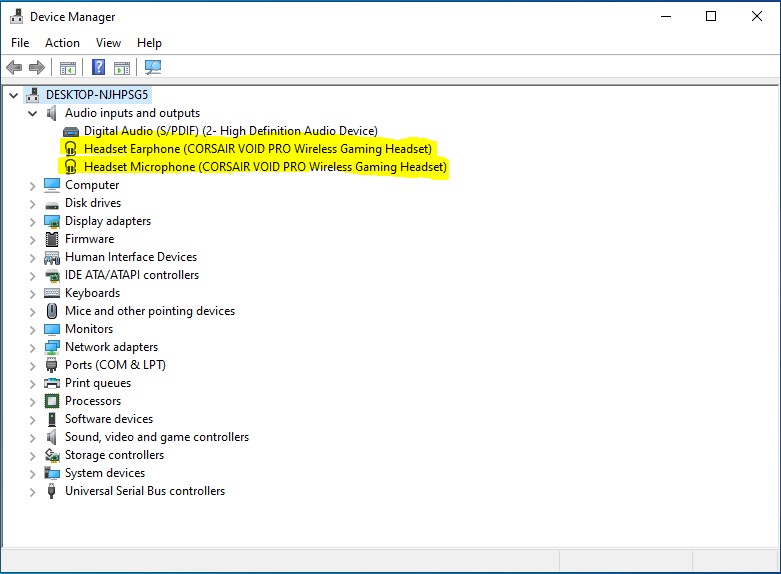
- Unplug the headset from your computer, and do NOT plug it back in until these instructions state to.
- Restart your computer.
- Once your computer has restarted, open the Windows Control Panel again.
- Select Programs and Features.
- Right-click on the Corsair iCUE software and select Uninstall.
- Restart your computer again.
- Once your computer has restarted, open an Internet browser and download the latest version of the iCUE software.
- Install the iCUE software.
- Restart your computer one last time.
- Once your computer has restarted, make sure iCUE is running.
- Plug in your headset and test the functionality.
Step three: Contact Customer Support
If you are still experiencing issues after trying the above, contact Customer Support and we will provide further assistance.
Stay up to date with CORSAIR. Get our latest News, Guides, and Product Updates in your Google feeds.
Add CORSAIR as a preferred sourceWas this article helpful?
Feedback received
Thanks for helping us improve this article.
JOIN OUR OFFICIAL CORSAIR COMMUNITIES
Join our official CORSAIR Communities! Whether you're new or old to PC Building, have questions about our products, or want to chat about the latest PC, tech, and gaming trends, our community is the place for you.