HOW TO
CORSAIR ONE: Wi-Fi or Bluetooth Not Working
If you are unable to make a Wi-Fi or Bluetooth connection with your CORSAIR ONE, check your CORSAIR ONE's antennae. Remove the two antennae and make sure that the pin on the inside is straight and not bent. Confirm that both are tightly connected to the unit. Bluetooth connects through the same antennae, and so both can be affected by a poor connection.
If the issue persists, it is possible that a driver may be corrupted. In order to correct a corrupted driver, you will need to cleanly reinstall the driver:
- Download the required Bluetooth driver (here) and Network Adapter driver (here).
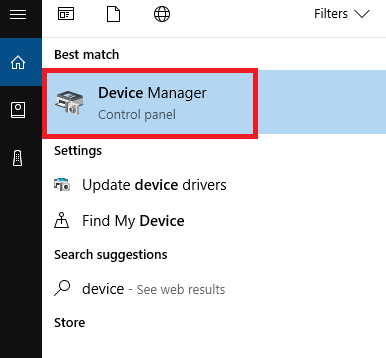
- Locate Cortana on the bottom-left of your Windows desktop and type in "Device Manager".
- Select the Device Manager from the search results.
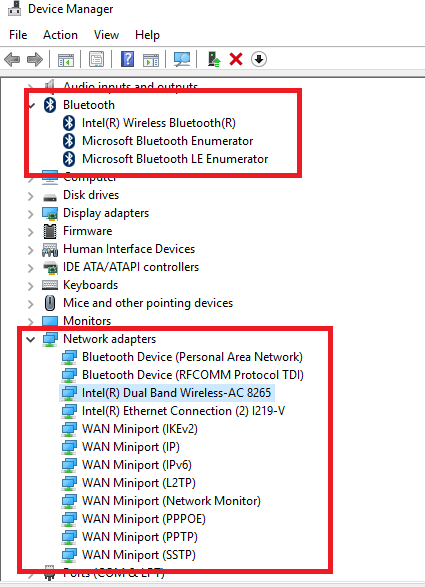
- Expand the "Bluetooth" and "Network Adapters" sections of the Device Manager.
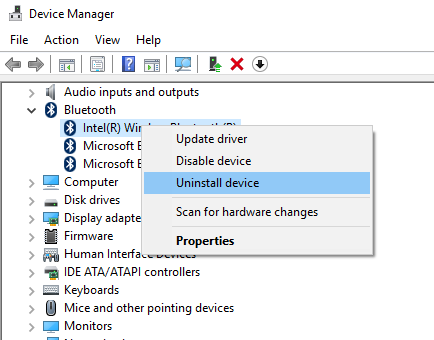
- Select each of the items listed under Bluetooth. Right-click on each item and select "Uninstall Device". Select "Uninstall" in the window that pops up.
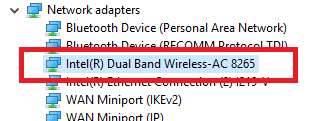
- Locate the "Intel (R) Dual Band Wireless-AC 8265" driver listed under Network Adapters. Right-Click on it and select "Uninstall Device". Select "Uninstall" in the window that pops up.
- Restart your computer.
- Once your computer has restarted, install the two driver files you downloaded in Step 1.
If you still continue to experience the issue after reinstalling the driver, please create a ticket on our website at: https://support.corsair.com/
Stay up to date with CORSAIR. Get our latest News, Guides, and Product Updates in your Google feeds.
Add CORSAIR as a preferred sourceWas this article helpful?
Feedback received
Thanks for helping us improve this article.
JOIN OUR OFFICIAL CORSAIR COMMUNITIES
Join our official CORSAIR Communities! Whether you're new or old to PC Building, have questions about our products, or want to chat about the latest PC, tech, and gaming trends, our community is the place for you.