You can use iCUE to create various key remaps and macros, then assign those remaps and macros to your CORSAIR keyboard.
NOTE: Make sure that you update iCUE and your keyboard to their latest versions to avoid complications.
To assign key remaps and macros:
- Make sure your keyboard is connected to your system.
- Open iCUE.
- Hover your mouse cursor over your keyboard in the home screen and click Key Assignments.
- Click the + button in the Assignments section.
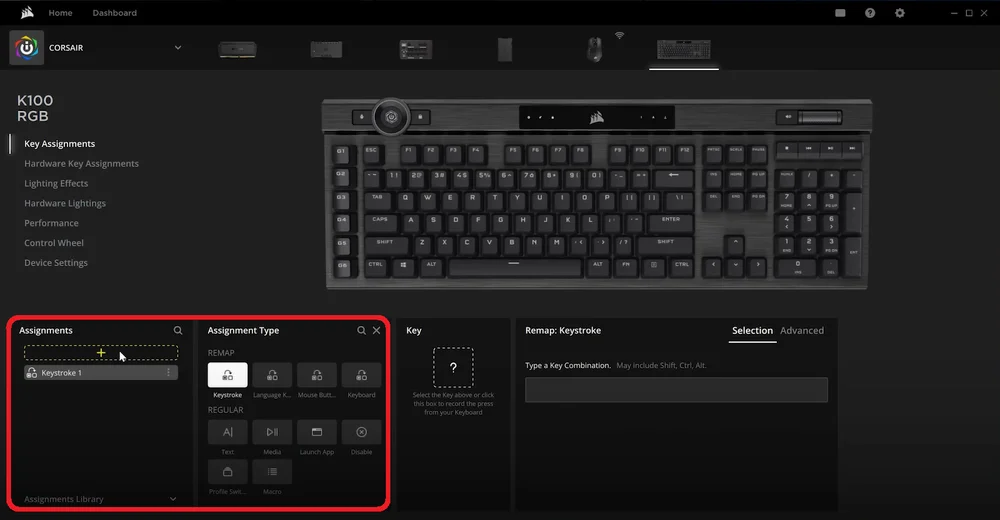
5. In the Assignment Type section, select the action you want to assign.
- If you select Macro, you can record your macro using the Macro section by clicking the record button, inputting the actions you want the macro to do, and then clicking the record button again to finish recording.

6. In the Key section, select the keyboard key that you want to assign the remap or macro to.
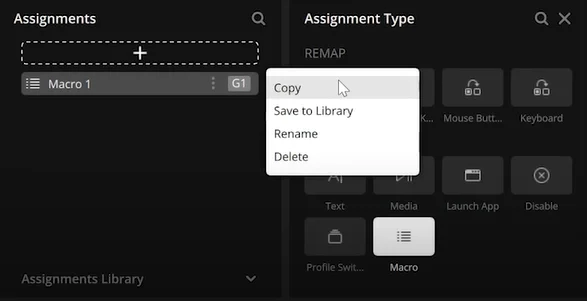
After you have created a key assignment, you can click the menu button next to it in the Assignments section to copy it, save it to your Library, rename it, or delete it.
JOIN OUR OFFICIAL CORSAIR COMMUNITIES
Join our official CORSAIR Communities! Whether you're new or old to PC Building, have questions about our products, or want to chat the latest PC, tech, and gaming trends, our community is the place for you.