The correct answer is “it depends on the CPU”, but generally speaking around 100C is where you will actually run the risk of the CPU damaging itself, so if you ever find your CPU getting into the 100C range on a regular basis you will need to take a close look at your cooling and the airflow inside your case.
What is a Standard CPU Temperature?
Most CPUs should operate in the 30-40C range when idle, and be around 65C to 85C under maximum load, roughly speaking. If you’re getting into the danger zone of 100C, and staying there for long periods of time, something is usually wrong either with your CPU cooler, the CPU itself, or you just need a more powerful cooler. Note your CPU temperatures will be greatly affected by the ambient temperature in the room. Also the spec sheet for your CPU should list its maximum temperature.
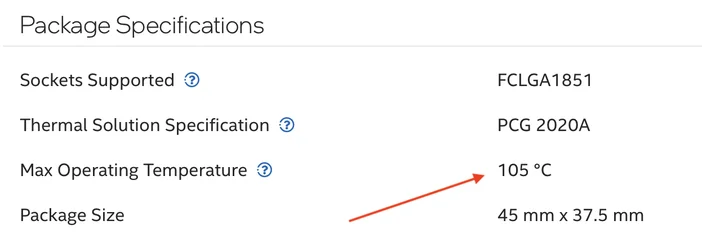
The maximum temperature for the Intel Core Ultra 9 285K is listed as 105C by Intel.
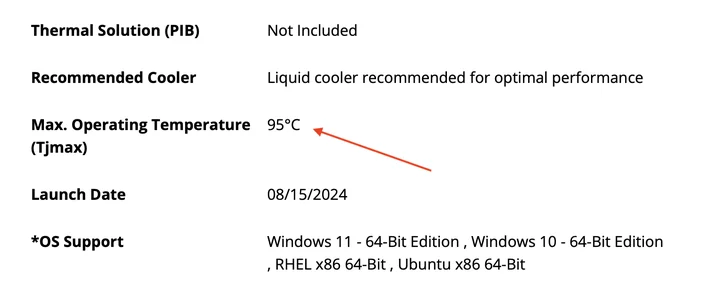
The maximum temperature for the AMD Ryzen 9 9950X3D is 95C according to AMD.
What Happens When a CPU Gets Too Hot?
Like GPUs, today’s CPUs are self-governed and will automatically adjust their clock speeds to stay within their specification envelope and provide stable operation. CPUs will overclock themselves when they have a workload to chew on and will downclock if temperatures get too high, so theoretically you should never have to worry about temperatures at all. However, when a CPU downclocks itself, or lowers its clock speeds, performance is degraded, so you want to avoid this scenario.
What are the Signs My CPU is Too Hot?
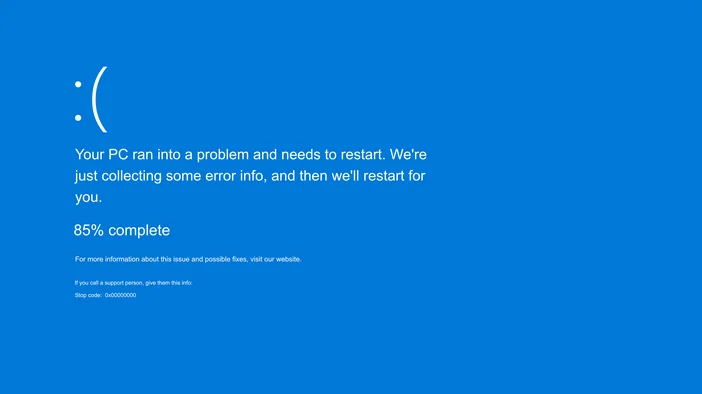
The two things you should expect if your CPU is running really hot are system instability, and excessive fan noise. Although a CPU shouldn’t shut the system off if it gets too hot, it can happen and it would manifest as random reboots, a Blue Screen of Death with a CPU-related error code, or just generally unexpected behavior from your PC.
For fan noise, most cooling systems will ramp up the fan speeds on the CPU cooling apparatus if the temperatures get toasty so you will hear them spinning faster than usual in a typical scenario. This all depends on what kind of CPU cooler you have and how it’s configured, but generally speaking most CPU coolers will get loud if temps climb into dangerous territory. Therefore, if something is wrong with your CPU cooler and it’s not cooling down the CPU fast enough, you will usually be made aware of it by how loud the fans have become.
What Causes a CPU to get too hot?
Your CPU will lower its clocks if it gets too hot, which should allow it to continue to operate. Therefore, if a CPU is getting too hot it usually indicates an issue with the CPU cooler, or it tells you the CPU cooler itself is not up to the task of cooling your CPU.
How do I Monitor my CPU’s temperatures?
There are a lot of free software tools available for monitoring CPU temperatures, including iCUE if you’re running Corsair hardware. If you want something different, there is always HWINFOand Core Temp. The best way to monitor your CPU temperature under load is to open one of these utilities so it’s visible on the desktop, then run a program that puts a load on your CPU such as Prime95or Cinebench. Once the stress test begins you can easily monitor your CPU temperatures. If you have a CORSAIR AIO with an LCD you can also set it to display CPU temps, as shown below.

What Should I Do if my CPU is Too Hot?
If you find your CPU is lowering its clocks to reduce its temperature on a consistent basis, you probably need a more powerful CPU cooler. Though the amount of cooling required will vary according to the CPU in question, you can usually never go wrong with a 360mm all-in-one CPU cooler as they are excellent at dissipating heat and taming even the most powerful CPUs. A beefy air cooler will also get the job done as well, so it comes down to whether you want to use air or liquid to cool your CPU, what kind of budget you are working with, and how much room you have inside your PC. This article explores the Air vs. Liquid debate.
PRODUCTS IN ARTICLE
JOIN OUR OFFICIAL CORSAIR COMMUNITIES
Join our official CORSAIR Communities! Whether you're new or old to PC Building, have questions about our products, or want to chat about the latest PC, tech, and gaming trends, our community is the place for you.