HOW TO
How to: Install the CORSAIR Hydro X Series XC7 RGB on the Intel LGA 1200
Have an Intel LGA 1200 socket and need some help installing your XC7 RGB cooler? We have a video to help walk you through the installation process.
Video instructions
Installing the XC7 RGB
To install the XC7 RGB:
- Remove the protective film from the self-adhesive side of the Intel LGA 1200 CPU backplate.
- Place the backplate on the motherboard; make sure to align the the backplate with the holes on the socket.
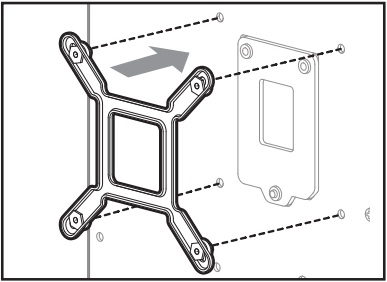
- Remove the TIM protective cover from the underside of the XC7 RGB water block.
- Place the water block on the Intel LGA 1200 CPU backplate.
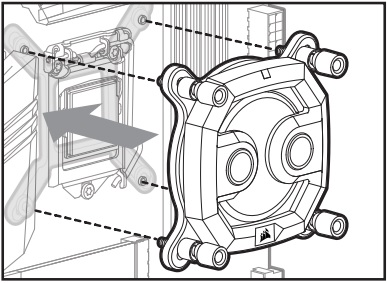
- Tighten the screws of the XC7 RGB to secure it onto the backplate.
- Use the included RGB adapter cable to connect the XC7 RGB to a CORSAIR lighting controller, another Hydro X series component, or a motherboard RGB header.
Once you have finished installing the XC7 RGB, you can use iCUE to customize the RGB lighting on your cooler.
JOIN OUR OFFICIAL CORSAIR COMMUNITIES
Join our official CORSAIR Communities! Whether you're new or old to PC Building, have questions about our products, or want to chat about the latest PC, tech, and gaming trends, our community is the place for you.