HOW TO
How to: Install the MP600 PRO Hydro X Edition M.2 SSD
The MP600 PRO Hydro X Edition has a pre-installed Hydro X Series XM2 M.2 SSD Water Block. We have a video to help you install it into your system.
Video instructions
Installing the M.2 SSD
Make sure that your PC system is powered down before you begin installation.
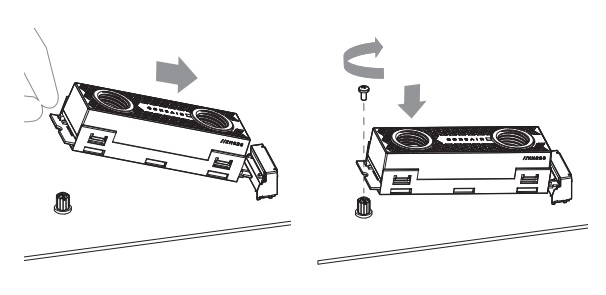
- Find an available M.2 key M 2280 slot on your motherboard.
- For shorter M.2 cards, make sure no screws / standoffs remain on the standoffs.
- Insert the M.2 NVME SSD into the slot.
- Secure the SSD with a screw.
- Install the two XF G1/4" BSPP threaded-type fittings onto the water block ports.
- Make sure you tighten the fittings by hand. Do NOT use tools to tighten the fittings.
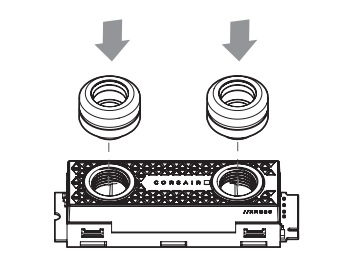
- Make sure you tighten the fittings by hand. Do NOT use tools to tighten the fittings.
- Install and secure the the water block tubing onto the ports.
- Either port can be used as the inlet or outlet; use whichever one works best for your configuration.
Make sure that you do a leak test before you power on your PC system.
JOIN OUR OFFICIAL CORSAIR COMMUNITIES
Join our official CORSAIR Communities! Whether you're new or old to PC Building, have questions about our products, or want to chat about the latest PC, tech, and gaming trends, our community is the place for you.