GLOSSARY
What are VRMs on a Motherboard?
A PC is a complex machine composed of various components that work together to perform highly sophisticated calculations and process large amounts of data across a wide range of applications. While it might look simple to see a specific task completed or to run games on a PC, behind the scenes, a lot of PC hardware is involved, including the motherboard.
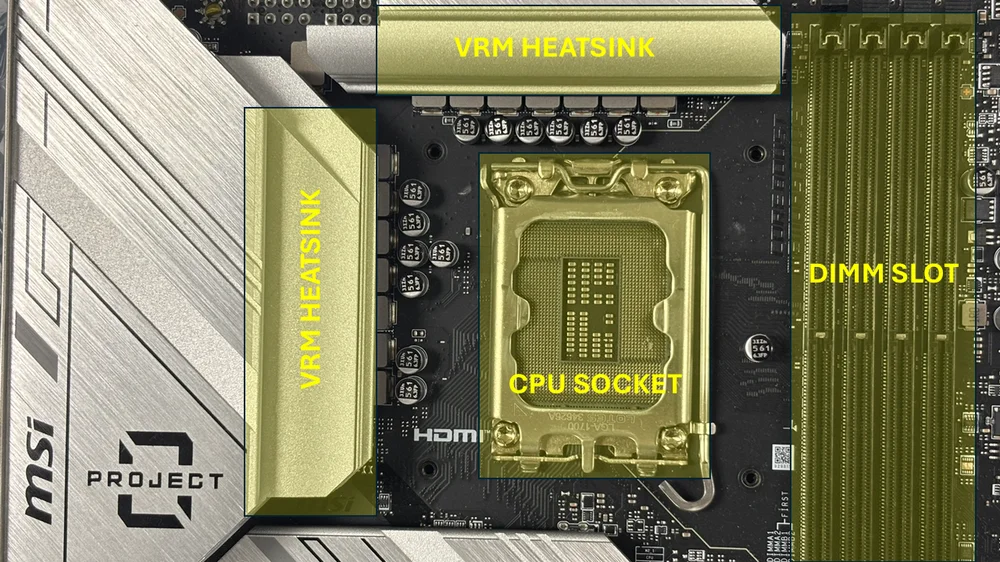
The motherboard itself is built from interconnected smaller components that work together to serve its purpose: acting as the main circuit board that connects all other PC hardware. It functions as the backbone of the system, enabling communication between the CPU, GPU, RAM, storage devices, and peripheral components. Each component on the motherboard has a specific role in the system’s overall functionality. One of these key components is the VRMs, located above and on the left of the CPU socket.
What does a motherboard's VRM do?
The VRM’s core function is to ensure that the CPU and other components connected to the motherboard are supplied with the appropriate voltage. It essentially regulates the voltage from the PC’s power supply. It converts it to a lower, stable voltage that the CPU, chipset, RAM, and other components can use, ensuring that all the components receive the correct amount of power, which is vital if you want your PC to run at an optimal level.
What makes up a VRM?
The VRM consists of components such as transistors (better known as MOSFETs), capacitors, chokes, and PWM controllers that regulate power delivery to various PC components.
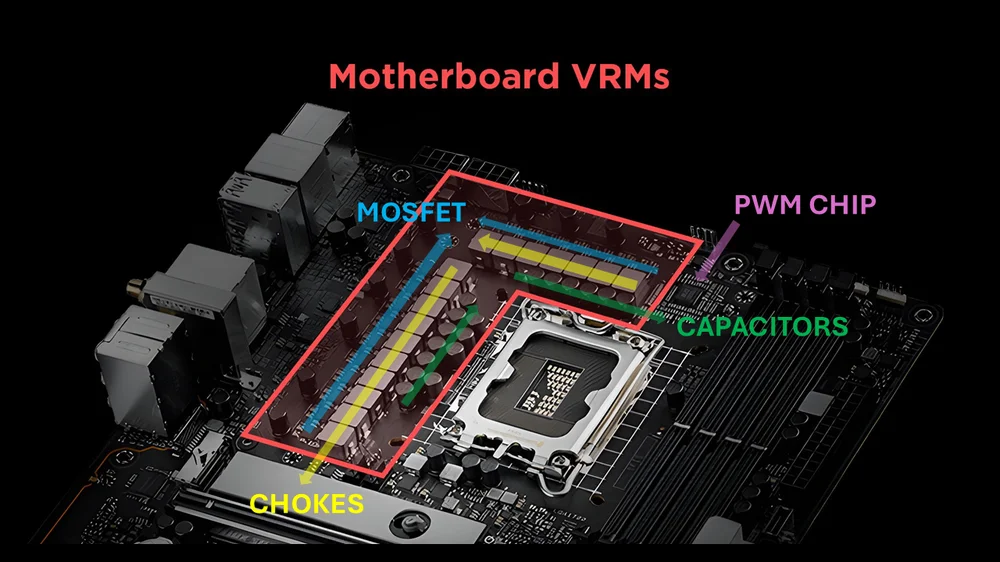
Image credit to CGDirector
Metal Oxide Semiconductor Field Effect Transistor, or MOSFET, you can think of it as a switch that opens or closes to regulate the electronic signals, both voltage and current, to the CPU, GPU, and other components, depending on the device’s specified power requirements. MOSFETs also contribute to the system’s longevity and stability by minimizing power loss and heat, thereby boosting the PC’s overall energy efficiency.
Chokes are technically the electrical current enforcer because they can handle high-frequency electrical signals from the PSU, specifically 12V, and convert them into the more stable 1.2-1.4 volts that the CPU and other components require. They are designed to filter and smooth out voltage spikes, ensuring the PSU’s voltage and current distribution remain steady for key PC components such as the CPU and GPU.
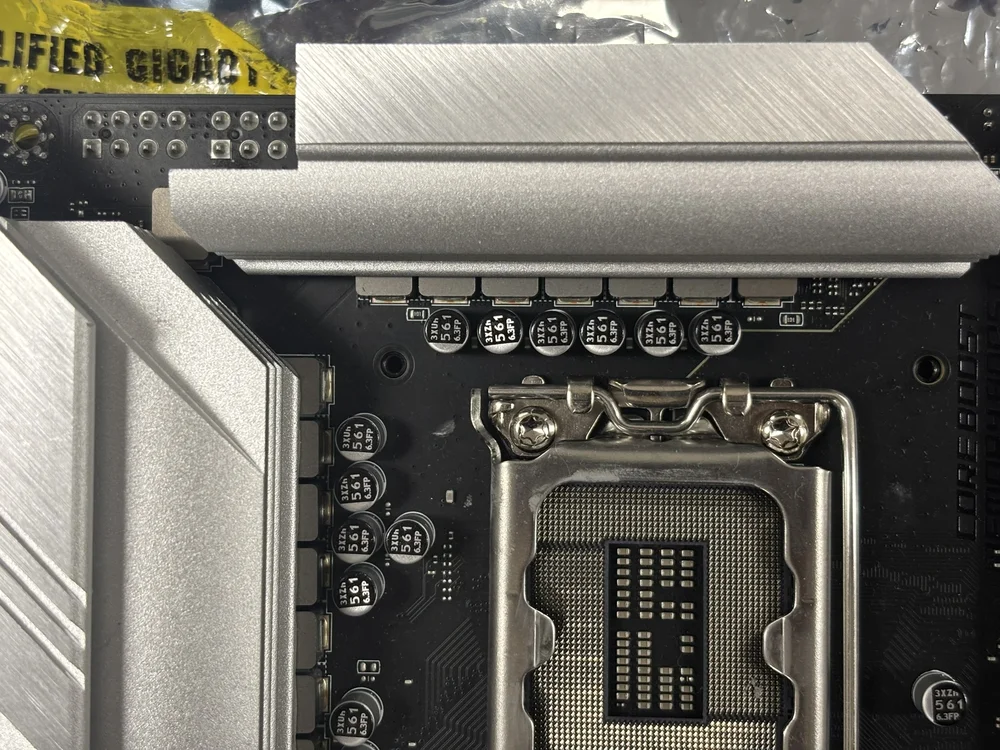
Motherboard capacitors function like other electrical capacitors in electronic devices. Essentially, they draw energy from the motherboard chokes, store it, and then quickly supply it to components like the CPU. They also release excess energy that is usually not needed and safely discharge any remaining energy through the ground connection.
And then you have the PWM controller, which stands for Pulse Width Modulator—the same concept used in PWM fans. It manages electrical flow by sending pulses to the key PC components connected to your motherboard.
How does VRM affect your PC build?
PC builders rarely pay close attention to the VRM’s quality on the motherboard. Understandably, because most focus more on the motherboard’s overall quality, such as the make and model. It’s almost a given that when you choose a premium, top-tier motherboard, it’s coupled with a high-quality VRM. This is because VRMs do influence your PC build in many ways.
Starting with performance: If your motherboard has low-quality or insufficient VRMs, running a high-end processor like an Intel i7/i9 or AMD Ryzen 9 can cause your CPU temperatures to rise above the normal operating range, even with an adequate cooling solution. This is a byproduct of poor voltage regulation. The more heat generated, the more the semiconductor’s resistance is affected by that heat, creating a feedback loop. Higher CPU thermal output can directly affect RAM performance and cause the CPU to throttle, resulting in lower frequency operation.

No PC user wants an unstable or unreliable system. Many of us prefer a PC that lasts a long time, especially if we’ve invested significant time and money into it. VRMs play a role in ensuring your PC lasts for years to come. Sure, they will degrade over time, which is normal. What you don’t want is for them to wear out prematurely. This usually happens with cheap VRMs because, remember, VRMs are under constant load, or in some PC builds, heavier loads than intended, which could lead to failure and crashes even at stock settings. Incorrect or inconsistent power distribution from your VRMs can also damage your CPU, GPU, and RAM, shortening the lifespan of your PC’s components.
Well-built and well-designed VRMs can withstand voltages higher than their specified limits. In PC overclocking, part of the process involves applying extra voltage to the processor to boost its speed beyond stock levels. The more voltage you feed the CPU, the harder it becomes for the VRM to regulate that voltage, making the size, quality, and number of VRMs crucial for successful overclocking.