GLOSSARY
What is a Kernel
The kernel is the core of an operating system the piece that lives between your apps and your hardware. It manages your computer’s resources (CPU, memory, storage, devices) and exposes a safe, consistent way for software to use them. Think of it as the traffic cop and translator that keeps everything moving without collisions.
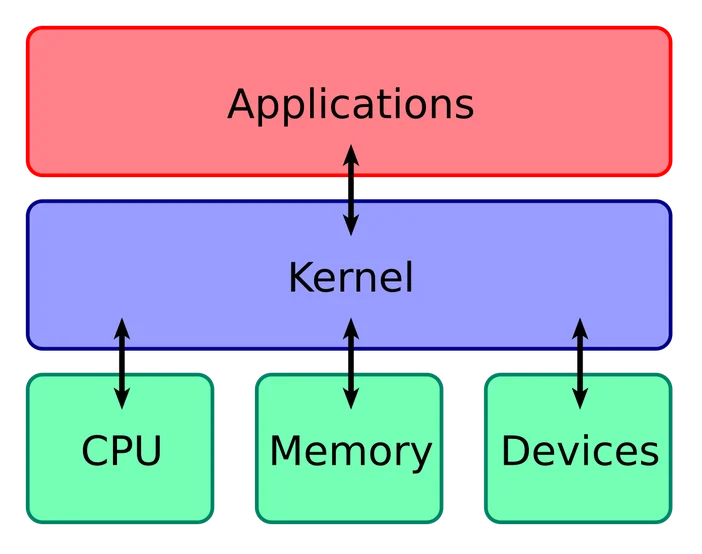
What does the kernel actually do?
At a high level, the kernel:
- Schedules work. Decides which program gets CPU time and when.
- Manages memory. Keeps each app’s data separate and allocates RAM as needed.
- Handles devices & files. Talks to drivers for your GPU, SSD, network card, and filesystems.
- Mediates I/O. Reads and writes files and network data on behalf of apps.
- Enforces safety. Separates user mode (apps) from kernel mode (the OS core) so that a buggy app can’t crash the whole system.
Is the kernel the same thing as the operating system?
Not quite. “Operating system” usually includes the kernel plus user‑space tools and services (shells, libraries, desktop environments, background services, etc.). In everyday conversation, people blur the terms but strictly speaking, the kernel is just the privileged core that everything else relies on.
How do apps “talk” to the kernel?
When an app needs to save a file or send a network packet, it makes a system call a controlled request that crosses from user mode into kernel mode. The kernel checks permissions, routes the request to the right subsystem or driver, and returns the result to the app. This boundary keeps apps safe from one another and from the hardware’s sharp edges.
Are there different kinds of kernels?
Yes. You’ll see a few broad designs discussed:
- Monolithic kernels bundle core services and many drivers together. (Example: the Linux kernel.)
- Microkernels keep the core tiny and push more services outside the kernel for isolation.
- Hybrid or modular approaches mix ideas practical systems often pull components into or out of the kernel boundary for performance or safety.
All of these aim at the same goal: reliable, fast control of hardware. (Apple’s XNU, for instance, combines a Mach microkernel with a BSD layer; Windows documents a layered kernel architecture.)
Do I ever update “the kernel” directly?
It depends on your platform:
- Windows/macOS: Kernel updates arrive as part of normal OS updates.
- Linux & many servers/devices: The kernel is a separate package you can update via your distribution or vendor. Long‑term‑support (LTS) kernels trade new features for stability.
Updating brings hardware support, performance tweaks, and security fixes but on production systems you’ll typically test first.
What happens during boot?
Very short version: firmware/UEFI runs first, the bootloader loads the kernel into memory, the kernel initializes hardware and drivers, mounts storage, and then launches the first user‑space process that brings up the rest of the system. After that, it continually schedules work and handles I/O in the background.
Does my phone have a kernel?
Absolutely. Android phones, game consoles, routers, smart TVs most run some flavor of OS with a kernel under the hood. The concept isn’t just for desktops and laptops.
Why do crashes get called “kernel panics” (or a “blue screen”)?
If something goes wrong inside the kernel (like a critical driver error), the OS often stops rather than risk corrupting data. Unix‑like systems report a kernel panic; Windows shows a stop error (the “blue screen”). It’s dramatic, but it’s a last‑ditch safety measure that protects your files.
Quick recap
- The kernel is the OS’s privileged core that manages CPU, memory, devices, and I/O.
- Apps interact with it via system calls across the user mode / kernel mode boundary.
- Different kernel designs (monolithic, microkernel, hybrids) balance performance, isolation, and maintainability.
Related terms
- User space / Kernel space: Regions where normal apps vs. the kernel run.
- System call (syscall): The controlled entry point from apps to kernel services.
- Driver: Kernel or user‑space component that knows how to operate a specific device.
- Scheduler: Kernel component that decides which thread runs next.
- Virtual memory: Kernel feature that gives each process its own address space.
- Bootloader: Program that loads the kernel into memory at startup.
- Kernel panic / stop error: A fatal kernel‑mode fault that halts the system to prevent damage.