GLOSSARY
What is an API?
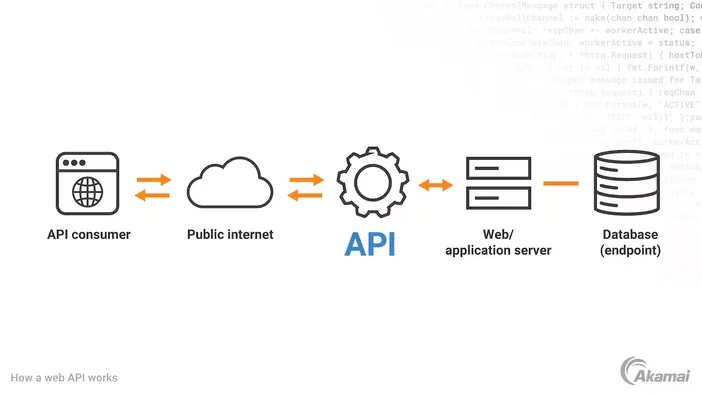
An API (Application Programming Interface) is a set of rules that lets one piece of software talk to another. Think of it as a menu: your app can “order” data or actions, and the API tells the kitchen (a service) exactly what to cook and how it’ll be served back.
APIs standardize how requests are made and how responses are returned, so different systems can work together reliably even if they’re built by different teams, companies, or in different programming languages.
What does an API actually do?
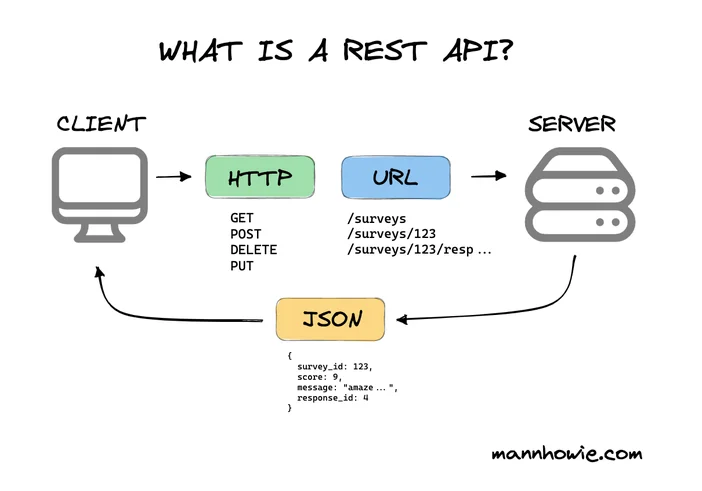
At a nuts-and-bolts level, an API defines endpoints (addresses you can call), the methods you can use (like GET to fetch data or POST to send data), the format of what you send (often JSON), and what you should expect back (data plus a status code like 200 for “OK” or 404 for “Not Found”). That predictability is the whole point.
API vs. SDK vs. UI what’s the difference?
- API: The contract what you can ask for and how you’ll get a response.
- SDK (Software Development Kit): A toolkit that often wraps an API with ready‑made code, examples, and utilities to make using the API easier.
- UI (User Interface): What humans click and tap. APIs are for software-to-software; UIs are for people.
If you want to be exact, you can use an API without an SDK, but using an SDK can save time and reduce mistakes.
Are there different “types” of APIs?
Yes several styles, each with trade‑offs:
- REST: The most common web style today. Resource‑based, uses HTTP methods (GET/POST/PUT/DELETE), typically JSON.
- GraphQL: Clients specify the exact fields they need in a single request—great for reducing over‑ or under‑fetching.
- SOAP: Older XML‑based protocol with strict contracts still used in some enterprises.
- gRPC: High‑performance, binary protocol popular for microservices.
- Webhooks: Not a request you make, but a callback the provider sends to you when something happens (like a delivery notification).
Is using an API “worth it”?
Usually, yes. Instead of building everything yourself, APIs let you plug in payments, maps, email, search, analytics, AI, and more. That saves engineering time, improves reliability (the provider keeps their service updated), and lets your team focus on what makes your product unique.
The trade‑offs: you inherit rate limits, pricing, and uptime dependencies from your provider. If your product can’t function without that API, plan for redundancy.
Do I need a special “key” to use an API?
Often. Many APIs require authentication so the provider knows who you are and can apply permissions and rate limits. Common approaches include:
- API keys: Simple tokens you send with each request.
- OAuth: A more secure, delegated method great when you need access on a user’s behalf.
- Signed requests / JWTs: Cryptographically signed tokens that expire and can carry claims (who you are, what you’re allowed to do).
Keep keys and tokens out of public repos and client-side code whenever possible.
Do I need special tools to call an API?
Not really. A web browser, curl, or any HTTP client works for many APIs. Developers often use tools like Postman or built‑in language libraries to make requests, inspect responses, and save examples. For production apps, you’ll use your language’s HTTP library or the provider’s SDK.
What uses APIs in the real world?
Pretty much everything modern: mobile apps pulling profiles, “Log in with Google/Apple,” online stores processing payments, smart home devices syncing, dashboards pulling analytics, even your weather widget. If software is exchanging data, there’s likely an API under the hood.
Jargon you’ll see (and what it means)
- Endpoint: The URL you call (e.g., /users/123).
- Request / Response: What you send vs. what you get back.
- Payload / Body: The data inside a request or response.
- Status code: Numeric result (200 OK, 201 Created, 401 Unauthorized, 429 Too Many Requests, 500 Server Error).
- Rate limit: How many calls you can make in a time window.
- Versioning: Keeping old and new API behavior separate (e.g., /v1/ vs. /v2/).
- Idempotent: Doing the same request multiple times gives the same result (e.g., GET).