GLOSSARY
What is M.2?
M.2, or to give it it's full name of "Next Generation Form Factor" (or NGFF) is currently the most compact form of expansion card used in modern PCs.
These small rectangular drives will usually be storage, but they can also be Bluetooth or WiFi modules. However, for this article we will be focussing the most common use which is for storage.
Comparing it to other storage solutions, it is smaller, faster and higher capacity with models up to 8Tb becoming commonly available. Additionally, when you compare them to an older 2.5" SSD (Solid State Drive) or a larger 3.5" HDD (Hard Disk Drive), there is another benefit as M.2 drives mount directly to your motherboard.
Is NVMe The Same as M.2?
Technically, no. M.2 is the form factor specification and NVMe drives are just one application of this.
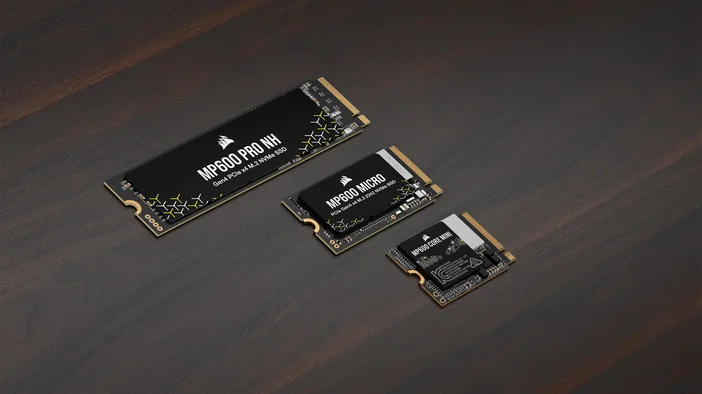
M.2 has three common sizes:
For most PCs you would use the M2280 which is the largest normal size card for a PC and most laptops. For some laptops and some hand held devices you would either use the middle sized M2242 or the smallest M2230.
For example the Steamdeck or MS Surface would use the M2230 as it's physically smaller and for a handheld or portable, smaller is always going to be better. Despite the smaller size, you can still get large capacities.
The Benefits of M.2
M.2 is useful for a host of reasons, lets look at these below.
- Speed - Some drives can sequentially write up to 12,400MB/s vs a 2.5" SATA drive which can only write up to 560Mb/s.
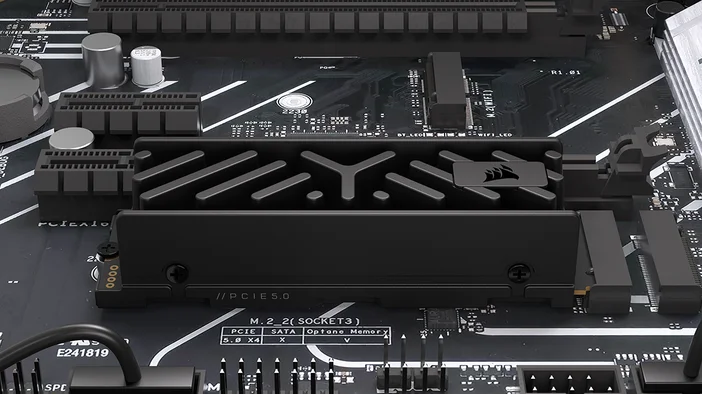
- Size - Compared to other internal storage options these are very small, and commonly mount onto the motherboard often nestled under heatsinks. But also are great in external enclosures due to their size
- Reliability - Because there are no moving parts like older mechanical drives, this removes the possible problems around a device being knocked or jolted in transit. Making them great for portable devices such as laptops and handhelds.
- Less clutter - Being directly mounted to the motherboard means there is two fewer cables, which is makes life easier and the PC look nicer.
Are There any Downsides to M.2?
There are some areas where an M.2 may not be ideal which we have detailed below.
- Cost - when compared to a mechanical hard drive either 2.5" or 3.5", the cost per Gigabyte is greater for an M.2 drive.
- Compatibility - If you have an older device, you may find you do not have an M.2 slot on your motherboard.
- Reduced PCIe bandwidth - This is more relevant to older chipsets, but in some instances, you may find the M.2 drive running slower than it can, especially if you have more than one in your system.
- Heat - NVMe storage runs hot, especially the faster PCIe 4.00 and 5.00 drives. This is why these drives come with heatsinks, and certain premium motherboards include heatsinks in the box.
PRODUCTS IN ARTICLE