CORSAIR: EXPLORER
Browse how-to guides, support articles, and other content related to CORSAIR products.
What’s new with RTX 40-Series GPUs
New power supply unit power requirements
New connectors and cables
Time to get into custom cooling

NVIDIA® GeForce RTX® 40-Series GPUs are beyond fast for gamers and creators. Experience lifelike virtual worlds with ray tracing and ultra-high FPS gaming with the lowest latency.
NVIDIA Ada Lovelace Streaming Multiprocessors:
Up to 2x performance and power efficiency
4th Generation Tensor Cores:
Up to 2x AI performance
3rd Generation RT Cores:
Up to 2x ray tracing performance
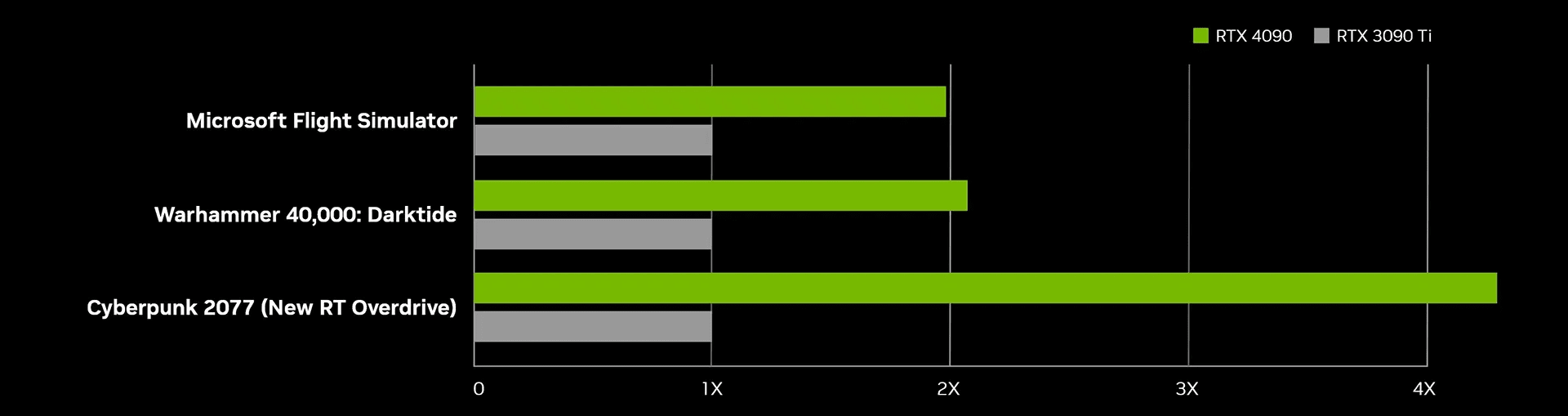
Relative Performance
3840x2160 Resolution, Highest Game Settings, DLSS Super Resolution Performance Mode, DLSS Frame Generation on RTX 40 Series, i9-12900K, 32GB RAM, Win 11 x64. All DLSS Frame Generation data and Cyberpunk 2077 with new Ray Tracing: Overdrive Mode based on pre-release builds.
More graphics power comes with higher power requirements. Make sure to choose a high-quality PSU to effectively power your new GPU.
Connect your new 12+4pin GPU port to two 8-pin PCIe ports on your PSU, so that it gets all the power it needs. You can also use the new CORSAIR 600W PCIe 5.0 cable, which also removes the need for adapters in your case.

High performance and power draw means higher heat output and cooling requirements. And nothing tackles heat like CORSAIR Hydro X custom cooling water blocks, so you get all the power you paid for.