MANUAL | QUICK START GUIDE
EX300U
USB External SSD
PACKAGE CONTENTS
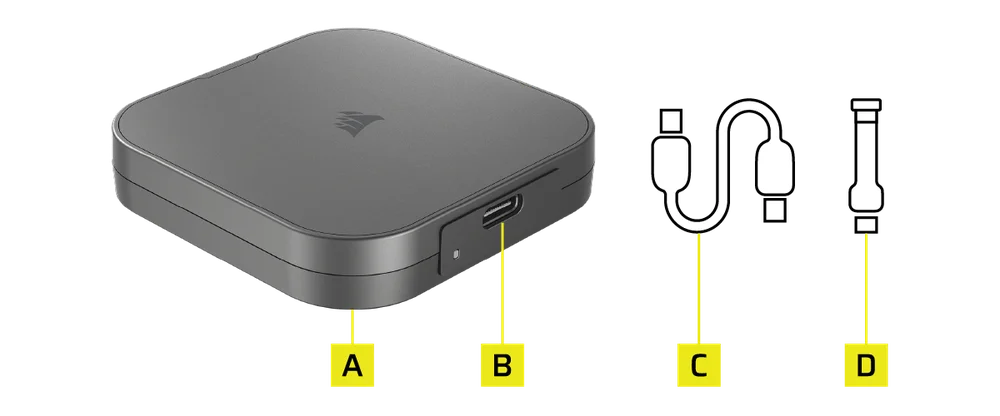
- EX300U
- USB Type-C Connector
- USB-Type C to USB Type-C Cable (10Gb) 30cm
- USB-Type C to USB Type-C 90-degree Cable (40Gb) 7cm
CONNECTING AND DISCONNECTING THE EX300U
Use the included USB-C to USB-C cable to connect to USB-C hosts. This connection type is required to achieve the optimum performance.
LED STATUS LIGHT
| LED blinks for 3s | Drive is being initialized for use |
| LED off | Device idle or disconnected |
| LED blinking | Data read or write operation |
GETTING THE EX300U READY FOR USE
The drive ships ready to use formatted with exFAT, a partition format that works on a variety of operating systems. Should you want to format the drive in another format, please use standard tools from your disk management or utility suite.
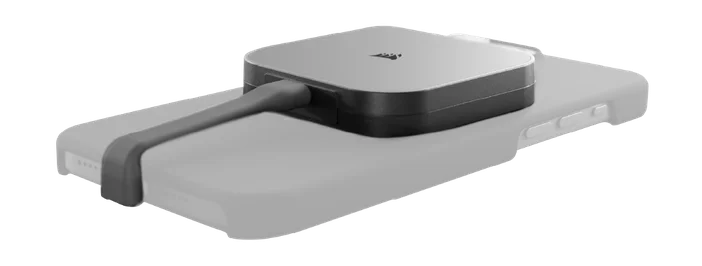
USING THE EX300U WITH iPHONE
The drive can be attached to the back of your iPhone using MagSafe, add version with the new shorter cable.
OPTIMIZING PERFORMANCE
The drive will perform at its highest speeds when connected to a USB-C (10Gb, USB 3.2 Gen2) port. It is compatible with Thunderbolt 4 and 5, USB 3.2, 3.0 and 2.0, but may not reach its maximum performance due to the lower bandwidth provided by these ports.
On Windows systems, the following drive policies will ensure optimal performance. These settings are available by right clicking Properties for the storage drive in Windows Device Manager.
- Enable performance optimized mode
- Enable drive write caching

INSTALLING THE SSD TOOLBOX
Please download the CORSAIR SSD Toolbox 2.0 or higher to obtain extended drive information and check for Firmware updates.
Not all functions of the SSD toolbox are available for External Storage. CORSAIR SSD Toolbox is available for Windows systems.
Download link: www.corsair.com/downloads.
WARRANTY YEAR

LEGAL STATEMENT
© 2025 CORSAIR MEMORY, Inc. All rights reserved. CORSAIR and the sails logo are registered trademarks of CORSAIR in the United States and/or other countries. All other trademarks are the property of their respective owners. Product may vary slightly from those pictured.