Memory Integrity, sometimes known as HVCI (Hypervisor-protected Code Integrity) is a security setting in Windows. When turned on, it makes it far more difficult for any rogue and untoward programs to get access to your computer.
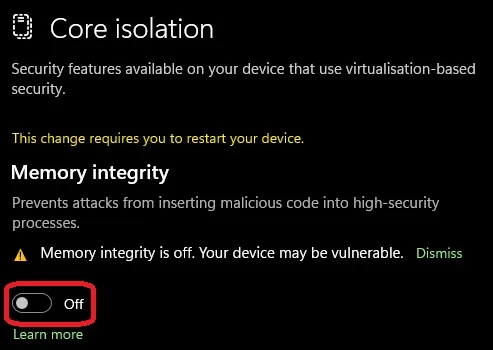
This makes it a handy setting to turn on, as it largely prevents attacks from low level drivers. This makes your PC far less vulnerable to malicious software that try to sneak in and hijack your PC.
How Does Memory Integrity Work?
Memory integrity uses a process called “Hardware Virtualisation.” Put simply, this creates an isolated environment where the program or driver or whatever is trying to run can be checked. This locked up (virtual) environment makes it so the malicious program in question can’t as easily affect the system.
Without that virtual environment, the Memory Integrity is far more exposed, and illicit software or drivers have an easier time sneaking past and getting into the system or directly messing with Memory Integrity itself.
Microsoft's blog post on the subject has a little more detail via an analogy about security guards and booths, so read that for a different explanation.
Now, the reason you might have found yourself on this page is that there are certain things that recommend or flat-out require Memory Integrity to be enabled, the Battlefield 6 Open Beta for example, lists “Memory Integrity Capable” in the specs. Just in case, here’s how to do it.
How to enable Memory Integrity
This process is simple, taking place within Windows. So, let’s enable Memory Integrity (HVCI). Let’s go.
- Right click on the Windows icon on the task bar and click on “Settings.”
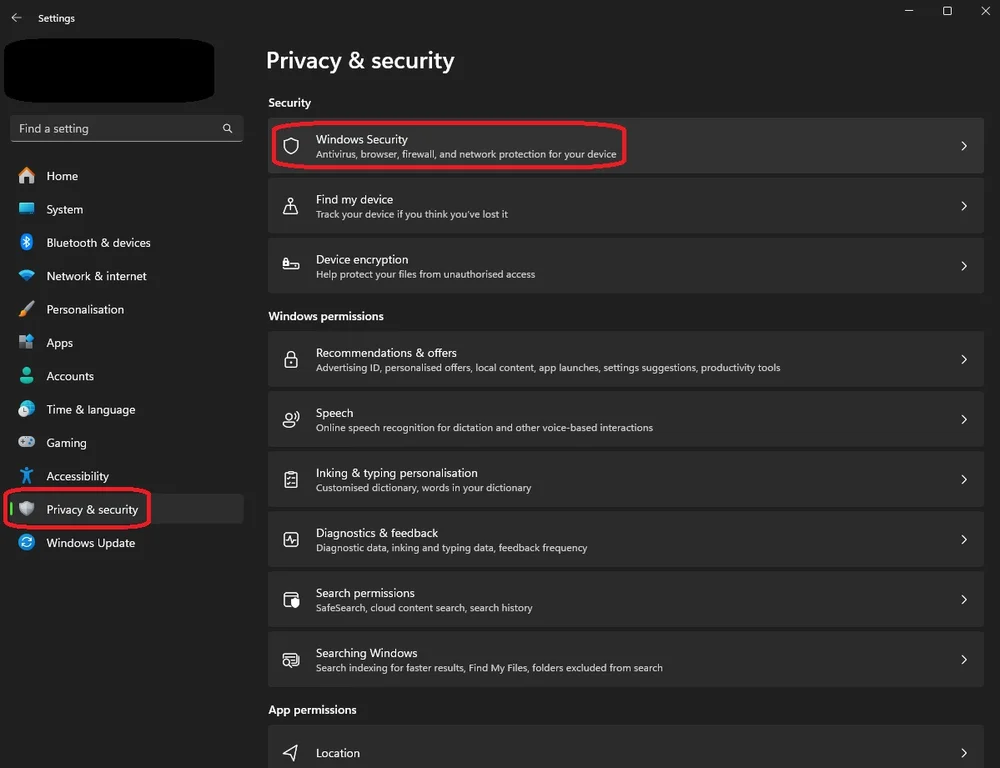
- Now click on the “Privacy & security” tab on the bottom right, then “Windows Security” at the top of the main section.
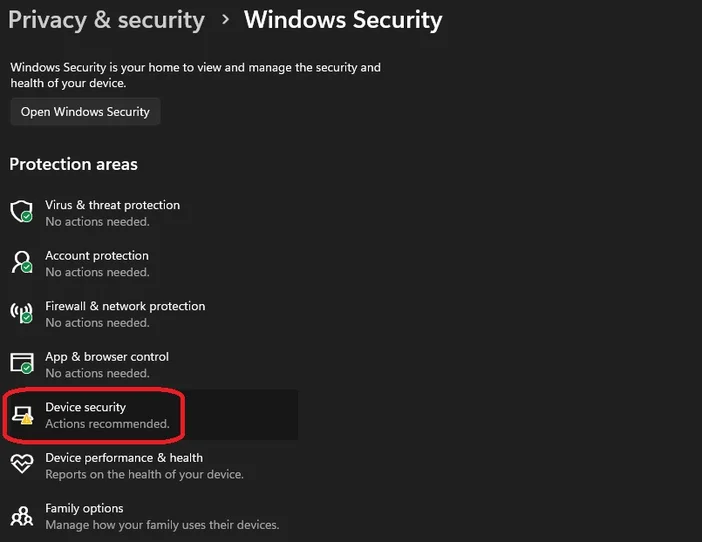
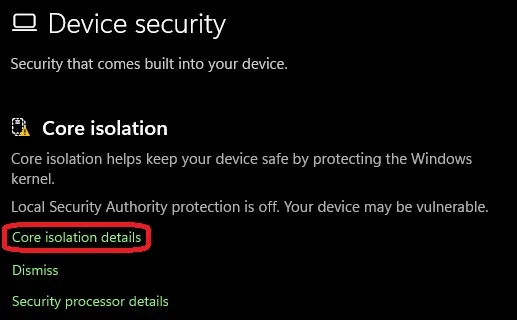
- In this menu, click on “Device Security”. This will open a new window. Here you click on “Core isolation details”.
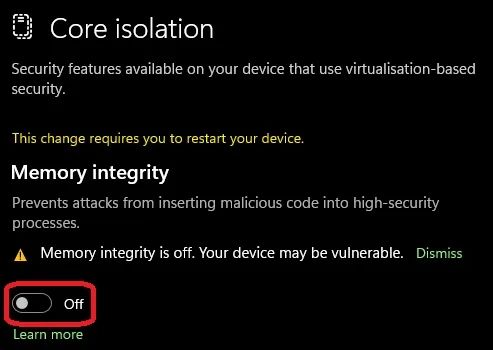
- In here, at the top you’ll see a “Memory integrity” section, with a toggle that’s set to “Off”. Click this to turn Memory Integrity on. (You’ll be asked to give permission to change this setting and need to restart your system to complete the process.)
However, some of you won’t see a “Memory Integrity” section within the “Core isolation details” menu. This is because you don’t have Hardware Virtualization switched on. This is a setting within the BIOS of your computer, which is easy enough to do. If the Memory Integrity option doesn’t appear for you, follow the steps below to turn on Hardware Virtualization.
How to Enable Hardware Virtualization
We did this process on a GIGABYTE AORUS motherboard with an AMD CPU so the steps might differ for you, but it will largely be the same steps (It might also be known as VBS, SVM, or “Intel Virtualization Tech”)
- Restart your PC and hit delete over and over until the BIOS appears.
- Go into the “Settings” tab. On our system it was underneath the tab called “Tweaker”.
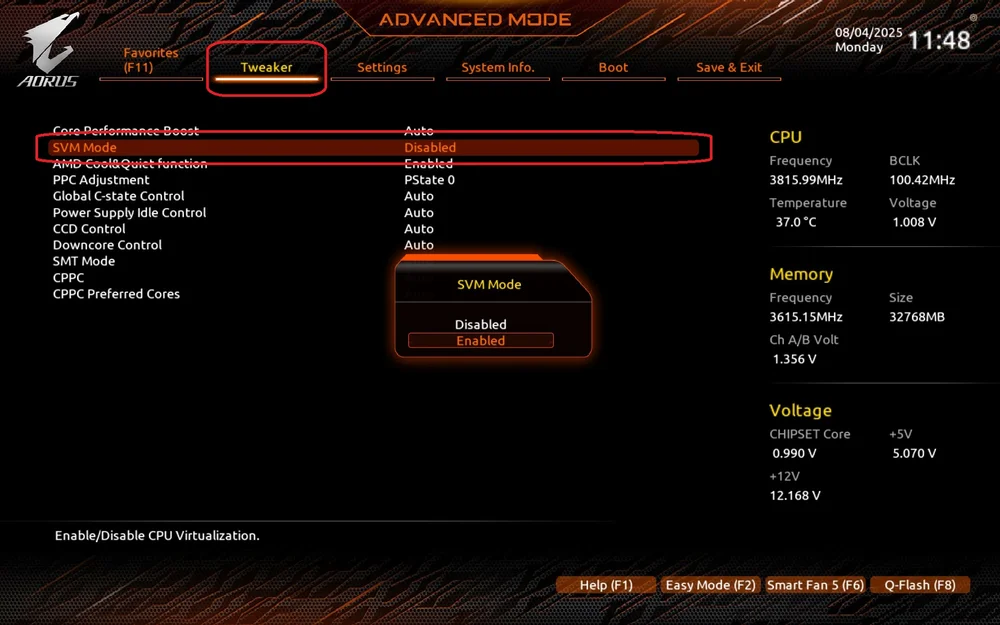
Now you’ll be able to follow the steps to enable Memory Integrity, and the setting will actually appear.
JOIN OUR OFFICIAL CORSAIR COMMUNITIES
Join our official CORSAIR Communities! Whether you're new or old to PC Building, have questions about our products, or want to chat about the latest PC, tech, and gaming trends, our community is the place for you.