The CORSAIR SSD Toolbox 2.0.129 offers a preview to our lightweight utility designed to support CORSAIR storage products.
System Requirements
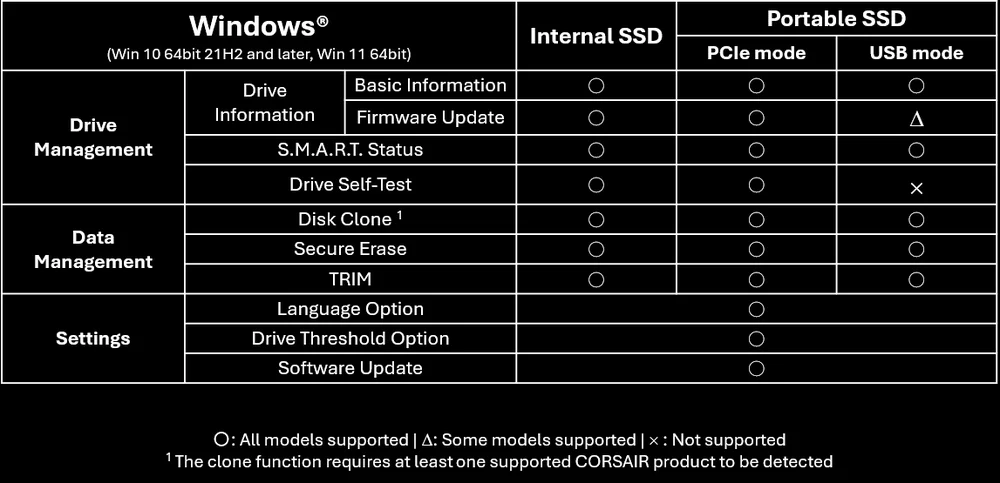
The CORSAIR SSD Toolbox™ runs on Windows® 10 64bit 21H2 and later, or Windows® 11 64bit. It supports NVMe/SSD drives running on Intel/AMD chipset-based systems with TRIM capable storage drivers on NVMe controllers connected through PCIe bus, SATA host controllers operating in AHCI mode and SSDs connected through USB ports using SATA-capable cables and enclosures. Please note:
- Some storage drivers will not properly pass ATA commands to the SSD drive affecting certain functions of the CORSAIR SSD Toolbox™. Make sure that your SSD drive is listed as an NVMe device in “Device Manager” – in some cases, your SATA drive may display as a SCSI device in “Device Manager” due to incompatible storage drivers. If you experience these issues, it may be necessary to change your storage drivers to Microsoft defaults or contact the chipset manufacturer for updated drivers.
- For proper operation and performance of NVME-related functions - please ensure you set the right PCIe throughput in BIOS configuration (x4 is preferred). If you have RAID mode in BIOS setup, please try to disable it if you have any problem.
- If you are using your Corsair SSD in an external enclosure, please ensure it is connected using the appropriate port and with an appropriate cable. Please refer to your enclosure documentation for details. In some cases, not all functions will be available when using an enclosure connected via USB. If your enclosure supports both USB mode and Thunderbolt connections, the preferred connection method is Thunderbolt as it may allow additional functionality if a tunneled PCIe connection can be established.
- SSD Toolbox does not support disks in RAID configuration.
Features
- Monitor drive status and health: View real-time status and health information for your CORSAIR SSD, and keep firmware updated to the latest available release.
- View S.M.A.R.T. drive status: Access detailed, industry-standard S.M.A.R.T. data and export it for further analysis.
- Drive health assessment: Receive an overall evaluation of your drive’s health based on integrated diagnostic checks.
- Data migration: Clone partitions to seamlessly move all your data to a new drive.
- Erase data securely: Permanently and securely erase sensitive data from a drive.
- Control TRIM status: Easily manage TRIM scheduling to maintain optimal data organization and performance.
Supported Products
- PCIe 3.0 M.2 SSD
- Force MP510
- PCIe 4.0 M.2 SSD
- Force MP600
- Corsair MP600 PRO
- Corsair MP600 PRO XT
- Corsair MP600 PRO LPX
- Corsair MP600 PRO NH
- Corsair MP600 GS
- Corsair MP600 CORE XT
- Corsair MP600 MINI
- Corsair MP600 CORE MINI
- Corsair MP600 MICRO
- Corsair MP600 ELITE
- PCIe 5.0 M.2
- Corsair MP700
- Corsair MP700 PRO
- Corsair MP700 PRO SE
- Corsair MP700 PRO XT
- Corsair MP700 ELITE
- External Storage
- Corsair Voyager GTX 3.1
- Corsair EX100U
- Corsair EX300U
- Corsair EX400U
- Corsair EX400U SURVIVOR
Supported Languages
- English
- Spanish
- French
- Italian
- Japanese
- Korean
- Portuguese
- Russian
- Simplified Chinese
- Traditional Chinese
Known Issues
- Font scaling may produce unexpected results if system language is set non-Latin based alphabet