VADOVAS | GREITAS PRADĖJIMO VADOVAS
CORSAIR iCUE LINK XC7 RGB ELITE CPU vandens blokas
PASIRINKTINIS AUŠINIMO CPU VANDENS BLOKAS SU RGB IR SKAIDRIA SRAUTO KAMERA
Anglišką versiją rasite čia - English
Jei turite kitų problemų, susisiekite klientų aptarnavimas


PRIEŠ PRADĖDAMI
Naujausią "iCUE" versiją atsisiųskite iš www.corsair.com/downloads.
Sužinokite daugiau apie "iCUE LINK System Hub" iš " CORSAIR" iCUE LINK System Hub.
PAKUOTĖS TURINYS

1x XC7 RGB ELITE Water block

1x Intel LGA 1851/1700 mounting bracket

1x AMD AM5/AM4 mounting bracket

1x Intel LGA 1851/1700 CPU backplate

1x iCUE LINK 90° cable 600mm

1x AM5/AM4 backplate adhesive
IŠANKSTINĖS SĄLYGOS (NEĮTRAUKTOS)

Phillips head screwdriver

iCUE LINK System Hub

iCUE version 5.5 or higher

Microsoft Windows 10 or higher

INTEL DIEGIMAS
1. SUMONTUOKITE "INTEL" PROCESORIAUS LAIKIKLĮ
The XC7 RGB ELITE may be installed in any direction, there is no performance penalty for installing the product rotated by 90° or 180°. Please remove the TIM protective cover from the underside of the water block. Avoid touching the thermal interface material.
1a. Sumontuokite "Intel LGA 1851/1700" laikiklį stumdami abi puses į siurblio lizdą, kol bus pritvirtintas(1 pav.).

1b. Nuimkite apsauginę plėvelę nuo lipniosios pusės ant (D) "Intel LGA 1851/1700" procesoriaus plokštės(2 pav.).
1c. Uždėkite pagrindinę plokštę lipniąja puse už pagrindinės plokštės. Sulygiuokite skyles, kaip parodyta toliau pateiktoje schemoje(3 pav.).

2. XC7 RGB ELITE DIEGIMAS
2a. Place the XC7 RGB ELITE onto the motherboard (Figure 1*).
2b. Secure the XC7 RGB ELITE onto the motherboard by tightening the screws by screwdriver until you reach the end of the thread. Tighten the screws evenly, preferably in a cross-pattern (Figure 2*).

AMD AM5/AM4 INSTALLATION
1. ĮDIEKITE AMD AM5/AM4 MONTAVIMO LAIKIKLĮ
The XC7 RGB ELITE LCD may be installed in any direction, there is no performance penalty for installing the product rotated by 90° or 180°. Please remove the TIM protective cover from the underside of the water block. Avoid touching the thermal interface material.
Install the AMD AM5/AM4 bracket by pushing both sides into the slot on the pump until secure (Figure 1).

2. PAGRINDINĖS PLOKŠTĖS PARUOŠIMAS MONTAVIMUI
Išimkite esamus AMD AM5/AM4 montavimo laikiklius atsukdami keturis (4) varžtus su "Phillips" galvute.
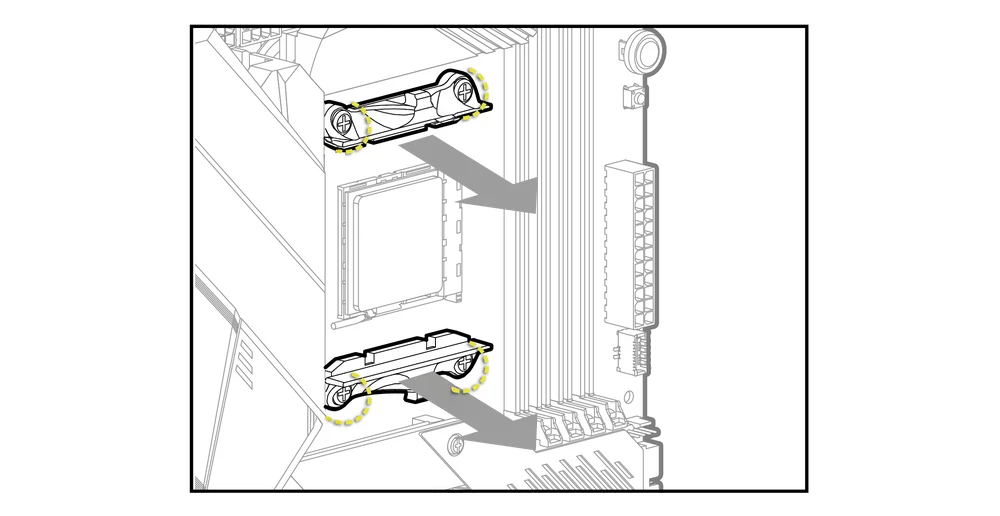
3. XC7 RGB ELITE DIEGIMAS

3a. Place the XC7 RGB ELITE with the pre-installed original AMD AM5/AM4 backplate onto the motherboard (Figure 1*).
3b. Secure the XC7 RGB ELITE onto the motherboard by tightening the screws by screwdriver until you reach the end of the thread. Tighten the screws evenly, preferably in a cross-pattern (Figure 2*).

JUNGIAMŲJŲ DETALIŲ IR VAMZDŽIŲ MONTAVIMAS
1. SUMONTUOKITE "CORSAIR XF G1/4" BSPP JUNGTIS
Į vandens bloko prievadus įstatykite dvi (2) tinkamas CORSAIR XF G1/4" BSPP sriegines jungtis (neįtrauktos į komplektą) ir priveržkite jas ranka. Atkreipkite dėmesį į nurodytus INLET ir OUTLET, kaip parodyta toliau pateiktame paveikslėlyje. Atkreipkite dėmesį, kad INLET visada yra arčiausiai jungties ant išorinio vandens bloko paviršiaus.

2. SUMONTUOKITE VAMZDŽIUS
Sumontuokite "CORSAIR XF" jungties tipui tinkamą vamzdelį ir užfiksuokite jį užfiksuodami žiedą, kad užbaigtumėte vandens bloko montavimą prie vandens aušinimo kontūro. Naudodami kitas nei suspaudimo jungtis, naudokite atitinkamą tvirtinimo būdą ir vamzdelį. Nepamirškite patikrinti sistemos sandarumo.
"iCUE LINK" jungtis
INTEGRUOTŲ IŠMANIŲJŲ FUNKCIJŲ PRIJUNGIMAS IR NAUDOJIMAS
Atsisiųskite naujausią "iCUE" versiją iš www.corsair.com/downloads.
Norėdami naudotis išmaniosiomis XC7 RGB ELITE CPU vandens bloko funkcijomis, turite prijungti pridedamą 90 laipsnių "iCUE LINK" kabelį nuo CPU bloko "iCUE LINK" antraštės prie "iCUE LINK" sistemos šakotuvo.

Ar šis XC7 RGB ELITE vandens blokas suderinamas su mano pagrindine plokšte?
Gaminys palaiko daugumą rinkoje esančių LGA-1700 ir AM4/AM5 pagrindinių plokščių, išskyrus kelias išimtis, kurios dažniausiai yra "Mini-ITX" formato pagrindinės plokštės.
Ar galiu naudoti XC7 RGB ELITE kaip atskirą dalį?
Ne, tai yra jūsų procesoriui skirta vandens aušinimo šaltoji plokštė, kuriai reikalinga visa pagal užsakymą sukurta vandens aušinimo sistema, įskaitant atskirą siurblį ir radiatorių. Daugiau informacijos rasite "Hydro X Series" puslapyje.
Ar galiu naudoti "XC7 RGB ELITE" su aliuminine vandens aušinimo įranga?
Ne, negalite. Šaltoji plokštelė pagaminta iš nikeliu dengto vario ir neturėtų būti maišoma su aliuminiu.
Ar svarbi srauto kryptis?

Taip, taip. XC7 RGB ELITE geriausiai veikia, kai aušinimo skystis patenka per įleidimo angą. Tačiau gaminys veiks ir esant atvirkštinei srauto krypčiai, nors ir su mažesniu aušinimo našumu.
Ar galiu pakartotinai naudoti iš anksto užteptą termoizoliacinę pastą ant "XC7 RGB ELITE" vandens bloko, kai jį montuoju iš naujo?
Iš naujo montuojant "XC7 RGB ELITE" vandens bloką reikės nuvalyti iš anksto užteptą šiluminę pastą ir užtepti naują šiluminės pastos sluoksnį. Rekomenduojame naudoti CORSAIR XTM70, parduodamą atskirai.
Kokia šiluminė pasta naudojama "XC7 RGB ELITE"?
GARANTIJA

HYDRO X serijos pagrindiniams gaminiams (CPU ir GPU blokams, siurbliams ir radiatoriams) suteikiama 3 metų garantija.
TEISINIS
© 2023-2025 CORSAIR MEMORY, Inc. All rights reserved. CORSAIR and the sails logo are registered trademarks of CORSAIR in the United States and/or other countries. All other trademarks are the property of their respective owners. Product may vary slightly from those pictured.
SUSIJĘS TURINYS


