HOW TO
How to: Enable power saving mode on your KATAR PRO WIRELESS gaming mouse
If the battery of your KATAR PRO WIRELESS gaming mouse is running low or you want your mouse to prioritize battery life, you can enable power saving mode on your mouse.
In power saving mode, your KATAR PRO WIRELESS will:
- Change the mouse sleep timer to 10 seconds
- Drop the mouse polling rate to 125Hz
If the battery life of your mouse goes under 15%, the mouse will automatically go into power-saving mode and will indicate the change by having the DPI indicator pulse red.
For iCUE version 5/4 and newer
Enabling power saving mode
You can enable power saving mode by using the scroll wheel of your mouse or using iCUE if you have it downloaded and installed.
To enable power saving mode by using the scroll wheel:
- Set the power switch of your KATAR PRO WIRELESS gaming mouse to “Off.”
- Press and hold down the scroll wheel of the mouse.
- While holding down the scroll wheel, set the power switch of your mouse to Bluetooth or 2.4GHz mode.
- Release the scroll wheel.
- To switch back to gaming mode, repeat steps 1 to 4.
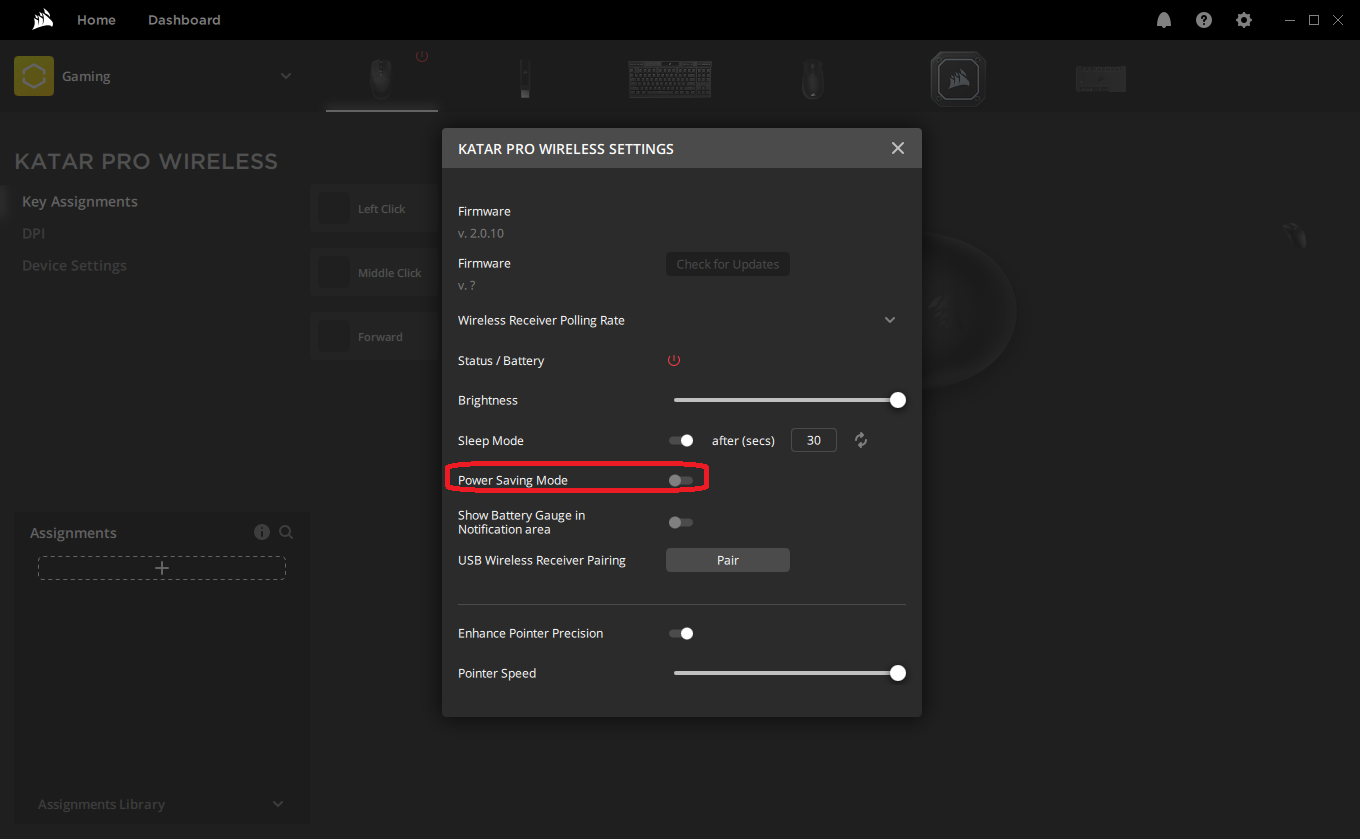
To enable power saving mode using iCUE:
- Open iCUE.
- Select KATAR PRO WIRELESS on your iCUE home screen.
- Select Device Settings.
- Enable Power Saving Mode toggle.
For iCUE version 3 or older
Enabling power saving mode
You can enable power saving mode by using the scroll wheel of your mouse or using iCUE if you have it downloaded and installed.
To enable power saving mode by using the scroll wheel:
- Set the power switch of your KATAR PRO WIRELESS gaming mouse to “Off.”
- Press and hold down the scroll wheel of the mouse.
- While holding down the scroll wheel, set the power switch of your mouse to Bluetooth or 2.4GHz mode.
- Release the scroll wheel.
- To switch back to gaming mode, repeat steps 1 to 4.
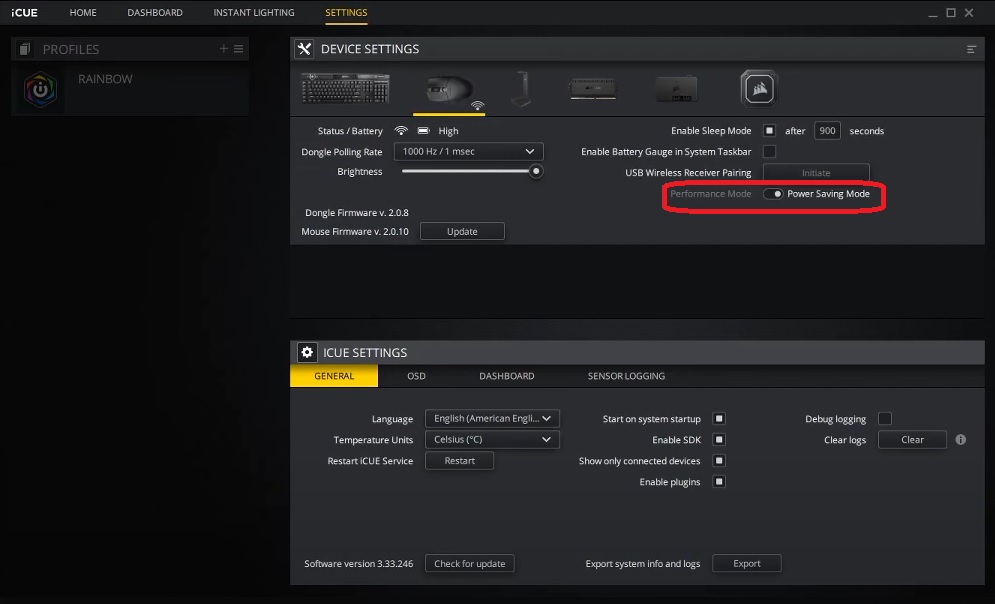
To enable power saving mode using iCUE:
- Open iCUE.
- Click SETTINGS.
- Select your KATAR PRO WIRELESS gaming mouse in the DEVICE SETTINGS section.
- Enable Power Saving Mode on the bottom right.
Video instructions
For instructions on how to enable power saving mode, go to 0:32 of the video below:
Stay up to date with CORSAIR. Get our latest News, Guides, and Product Updates in your Google feeds.
Add CORSAIR as a preferred sourceWas this article helpful?
Feedback received
Thanks for helping us improve this article.
JOIN OUR OFFICIAL CORSAIR COMMUNITIES
Join our official CORSAIR Communities! Whether you're new or old to PC Building, have questions about our products, or want to chat about the latest PC, tech, and gaming trends, our community is the place for you.