The short answer for most people is “No, not usually,” but it depends on your specific setup. In general though, unless you are doing extreme overclocking, you don’t typically need to connect both CPU power cables.
What are CPU Power Cables?
A CPU gets power from the power supply via cables that plug into connectors on the top left-hand side of the CPU socket. They are in the corner of every motherboard on the market today. There is always at least one connector there, and some motherboards have two. The connectors can be configured as follows:
- One four-pin connector (uncommon)
- One eight-pin connector
- One eight-pin and one four-pin
- Two eight-pin connectors
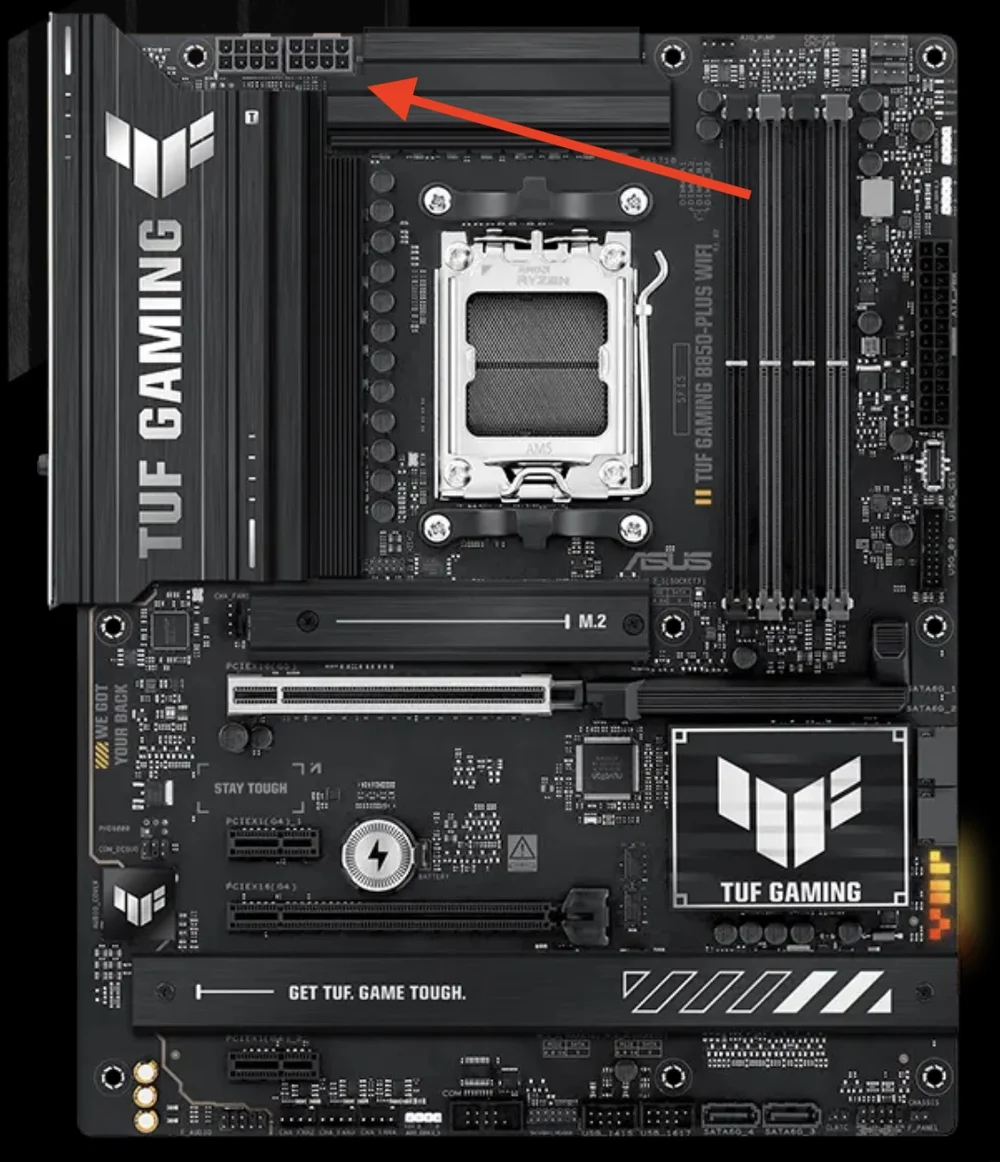
Most midrange to high-end motherboards today have two 8-pin connectors for CPU power.
These connectors are usually referred to as EPS12V for an eight-pin connector and ATX12V for a four-pin connector, but both versions provide power to the CPU. They are also sometimes referred to as CPU_PWR depending on the motherboard manufacturer.
Why are There Two Cables on a Lot of Motherboards?
If you ask the motherboard manufacturers, they would likely say to provide a lot of extra power to the CPU. If you ask us for our opinion, we'd say it is mostly for marketing purposes, as it looks cool and is fancier that using just one cable, and it means the motherboard supports a lot of power to the CPU socket, which is not necessary for the vast majority of users.
However, it certainly sounds cool and at the very least your board will never be limited in this area of performance. It’s similar to a sports car touting a top speed that is unobtainable; you will never use it, but it’s nice knowing you could use it if you wanted to in the future.
How Much Power Do These Cables Provide?
A single eight-pin EPS cable provides over 300W of power, and a four-pin ATX12V connector provides around 190W or power.
How Much Power Does a CPU Need?
The flagship AMD CPU in 2026 is the Ryzen 9 9950X3D with a TDP of 170W while Intel’s flagship Core Ultra 9 285K which has a base power of 125W and a Maximum Turbo Power of 250W.
Given these numbers we can comfortably conclude that there is no consumer CPU on the market today that requires more than 300W of power for standard computer usage, so a single eight-pin EPS cable will be more than sufficient for any consumer CPU on the market. We don’t expect this situation to change any time soon either, as it’s been this way for many years, and Intel and AMD are generally wary of upping the power requirements on their consumer CPUs as it would inhibit adoption.
Can I Still Plug in Both Cables?
Of course, and it will never cause any issues, so if your power supply has two EPS cables, and your motherboard has two connectors, feel free to connect both of them.
That said, a common scenario is a motherboard with two eight-pin EPS connectors, and a power supply with only one cable, so connect the one closest to the CPU and leave the other one empty, as shown below.
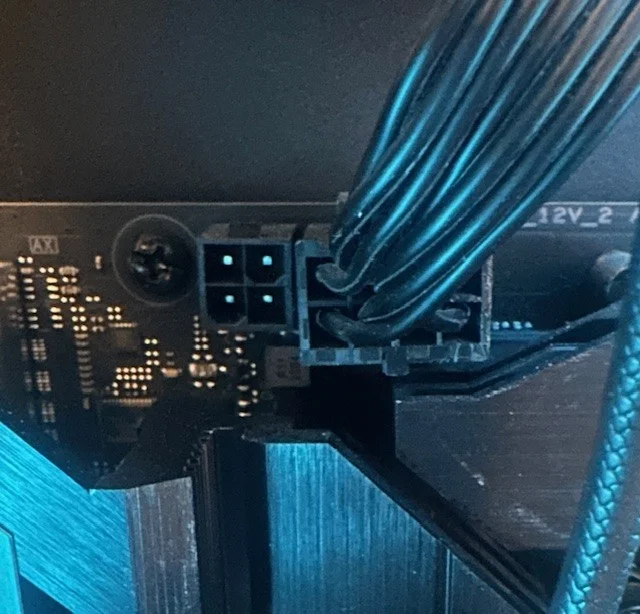
As long as the main 8-pin connector is populated, you can safely leave the 4-pin next to it empty.
How Do I Connect an Eight-Pin and a Four-Pin?
If your motherboard is like the image above and you want to connect both cables, the EPS12V cables that come with a power supply are usually a 4+4 design, so they can be broken off into two four-pin connectors exactly for this purpose. If you only have one cable and it’s a 4+4 and there is an eight-pin slot, you connect both cables to each other and then plug them into the slot. If you have a second cable, you just use one of its four-pin connectors.
Why is this so Confusing?
The vast majority of motherboard manuals do not explain anything about the CPU power connectors and just say “connect these for CPU power.” We have yet to find a single motherboard manual anywhere that says “you do not need to connect both cables” even though most people do not need both cables connected. Just make sure the connector closest to the CPU socket is populated and you will be totally fine.
If you want to do extreme overclocking with liquid nitrogen and advanced cooling you will need the power from that second connector, but if you’re in that camp you surely already know that.
JOIN OUR OFFICIAL CORSAIR COMMUNITIES
Join our official CORSAIR Communities! Whether you're new or old to PC Building, have questions about our products, or want to chat about the latest PC, tech, and gaming trends, our community is the place for you.