BLOG
What's the difference between CORSAIR Type-3, Type-4 and Type-5 cables?
Also, what's the difference between gen 4 and 5, and why are we trying to confuse you?
Well, we really are not – we promise. As PSU standards evolve, changes sometimes needs to be made to give our users the best possible products.
Type-3 vs Type-4
Type-3 were the very first modular cables we made, and were later replaced by the Type-4 standard. If you have bought a CORSAIR power supply within the last 8 years you most likely have a Type-4, and not a Type-3 PSU, but you can always see on the cables what type they are.
If they have no text on them, or says Type-3, then they are Type-3.
So what is the difference between type-3 and type-4?
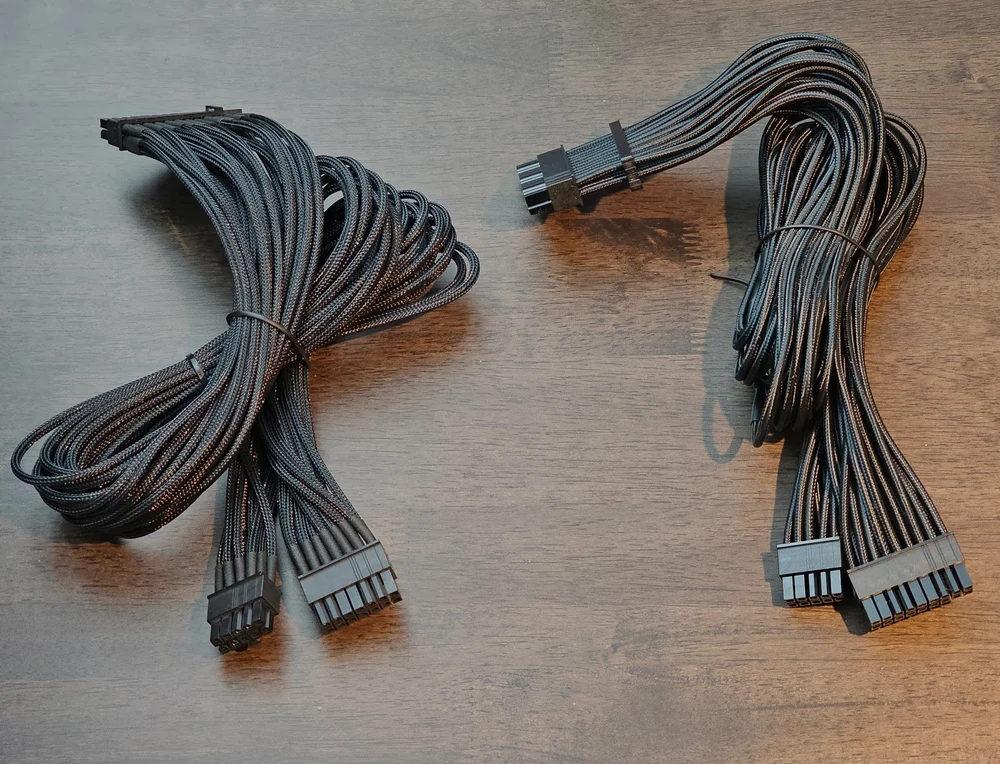
Notice that the connectors that go into the power supply is different on the two cables. Type-3 (on the left) has a 10 pin and a 14 pin connector, while the Type-4 (on the right) has a 10 pin and a 18 pin connector).
The only difference that matters to you is that Type-3 uses a different 24 pin cable than Type-4. ALL other cables are compatible.
It is worth noting however that the Type-3 and Type-4 PCI-e cables have a different pinout on the PSU side, but this does not matter. The pins that was moved was moved from one 12V pin to another 12V pin (Confusing, yes we know but trust us we do not do it do annoy you)
So to reiterate – ONLY the 24 pin cable is different from Type-3 to Type-4. All other cables can safely be used on a Type-4 power supply even though they say Type-3.
Type-4 vs Type-5
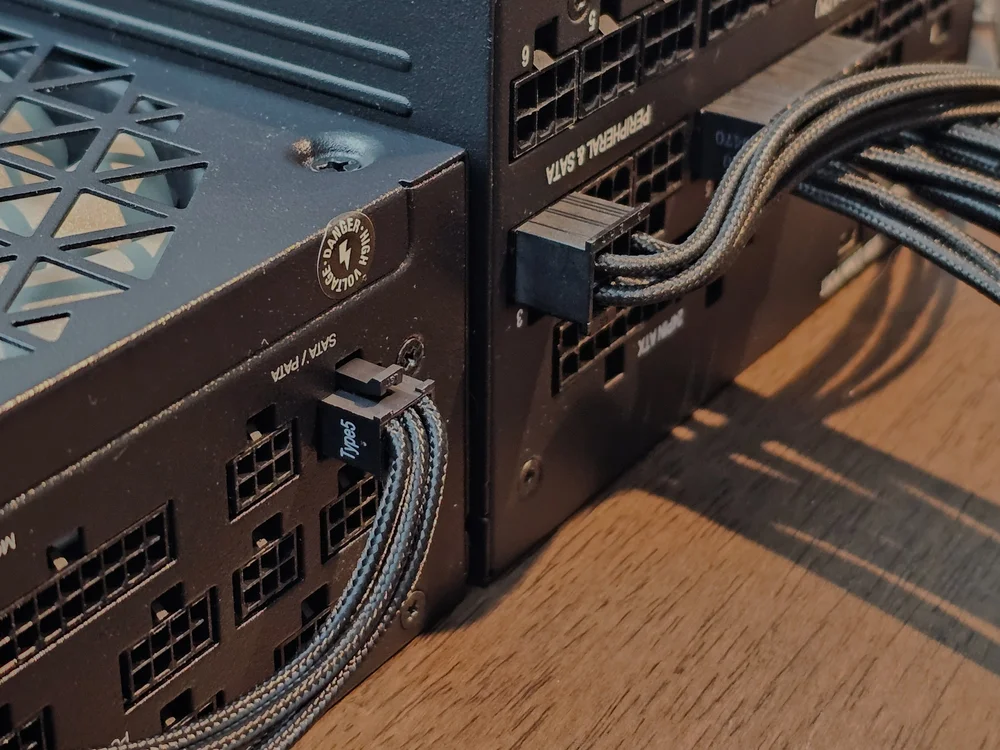
Type-5 (on the left,) and Type-4 (on the right.) Notice how the Type-5 plug is much smaller than the Type-4.
It is a bit easier to explain Type-5 since this cable standard was created to make it easier to manage your cables in tight spaces. Type-5 was originally created for our SHIFT series of power supplies to have a lower profile connector on PSU side.
Later on, Type-5 was also introduced on the SF-L series and updated SF series power supplies.
“But don't smaller connectors mean less power?”
Absolutely not – the connectors are rated for the exact same power delivery as the larger Type-4 connectors, so you can still safely power whichever hardware your gaming or productivity needs require.
Type-3 vs gen-3
Now that we have the different types explained, what about the different generations?
This is also quite simple – we sometimes updates our sleeved cables with better sleeving, better cable combs or embossed cables. Any time we find a way to make the building experience better for end-users we might decide to make a new “generation” of cables.
There is no difference in what power supplies these cables works with, but there is a different in the look and feel of the cables.
At the time of writing this article (January 2025) the latest cable generations are:
- Type-4 Gen-4
- Type-4 Gen-5 (Currently only bundled with recent power supplies and as stand alone 12V-2x6 cables)
- Type-5 Gen-5
The difference between Gen 4 and Gen 5 is that generation 5 no longer uses paracord sleeving, but instead a sleeving pattern is embossed into the cable, making it much easier to work with, and removes the possibility of the sleeving fraying over time.
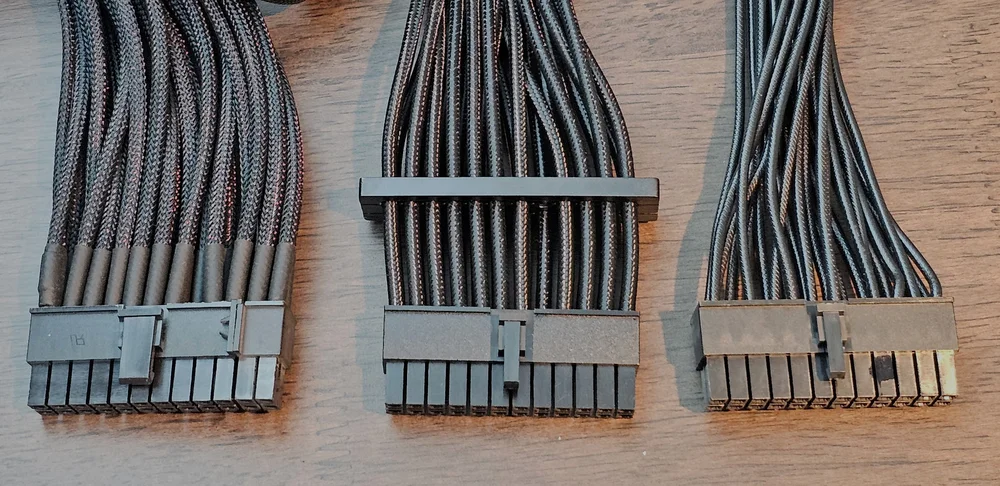
Gen 2 (Left), Gen 4 (Middle), Gen 5 (Right)
In the picture above you can see the main different between the different generations. From left to right is:
- Generation 2 - sleeved with heatshrink
- Generation 4 - sleeved, but no visible heatshrink
- Generation 5 - embossed cables which are more flexible and smaller than previous generations, while still retaining the look of a sleeved cable.
PRODUCTS IN ARTICLE
JOIN OUR OFFICIAL CORSAIR COMMUNITIES
Join our official CORSAIR Communities! Whether you're new or old to PC Building, have questions about our products, or want to chat about the latest PC, tech, and gaming trends, our community is the place for you.