The CORSAIR GALLEON 100 SD is built to deliver elite gaming performance and deep customization without burdening users with heavyweight software. That philosophy is embodied in CORSAIR Web Hub, a browser-based control interface that allows users to configure core keyboard functions quickly, intuitively, and without installing traditional desktop software.
Web Hub is where performance, personalization, and precision come together. From lighting effects and key assignments to advanced FlashTap SOCD behavior, Web Hub gives users direct control over how the GALLEON 100 SD behaves while keeping system overhead low and setup friction minimal.
What Is CORSAIR Web Hub?
CORSAIR Web Hub is a lightweight, web-based configuration tool that runs directly in your browser. Instead of relying on always-on background software, Web Hub connects to the keyboard when needed, applies changes, and stores those settings directly on the device.
This approach offers several advantages:
- No traditional software installation required
- Fast access from supported browsers
- Minimal system resource usage
- Settings persist on the keyboard itself
Once configured, the GALLEON 100 SD retains its behavior even when Web Hub is closed or when the keyboard is moved to another system.
Customizing Lighting Effects
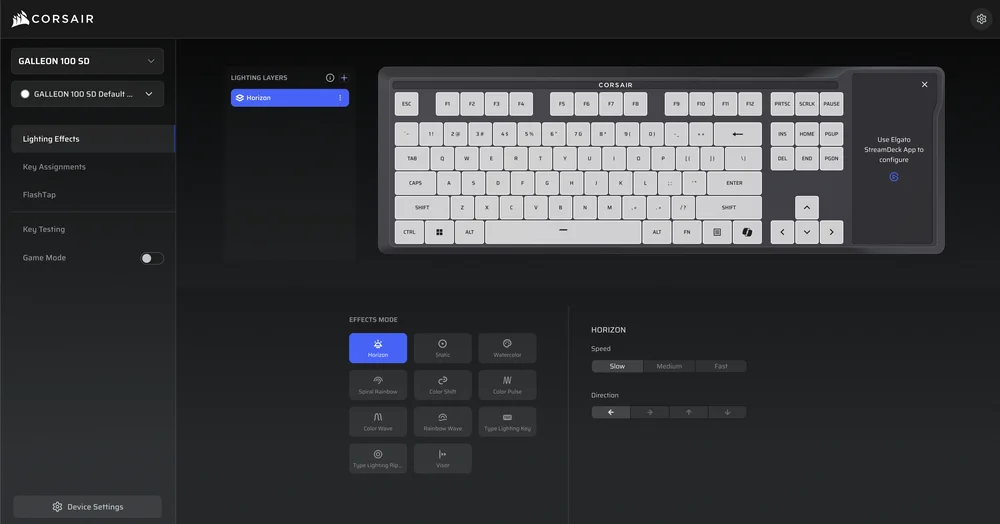
One of the most common uses of Web Hub is lighting control. Through an intuitive visual interface, users can adjust:
- Per-key RGB lighting
- Brightness levels
- Static or dynamic lighting effects
- Color zones and themes
- Hardware lighting profiles
Changes are previewed in real time, allowing users to see exactly how the keyboard will look before saving. Because lighting configurations are stored onboard, your chosen effects remain active regardless of system or software state making it ideal for users who move between setups or environments.
Key Assignments and Keyboard Behavior
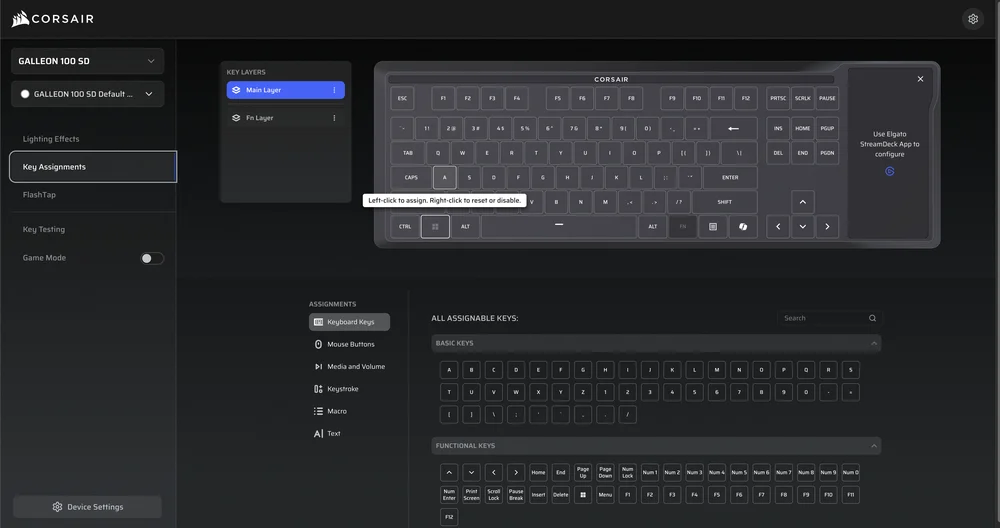
Web Hub also enables key reassignment and behavior customization. Users can remap keys, assign secondary functions, or tailor specific inputs to better suit their playstyle or workflow.
This is particularly useful for:
- Optimizing layouts for different games
- Adjusting keys for productivity or accessibility
- Fine-tuning controls without external macro software
Unlike Stream Deck actions, which are handled through Elgato’s Stream Deck software, these changes affect the core keyboard layer, ensuring consistent behavior in Hardware Mode, competitive play, or console use.
FlashTap SOCD Configuration
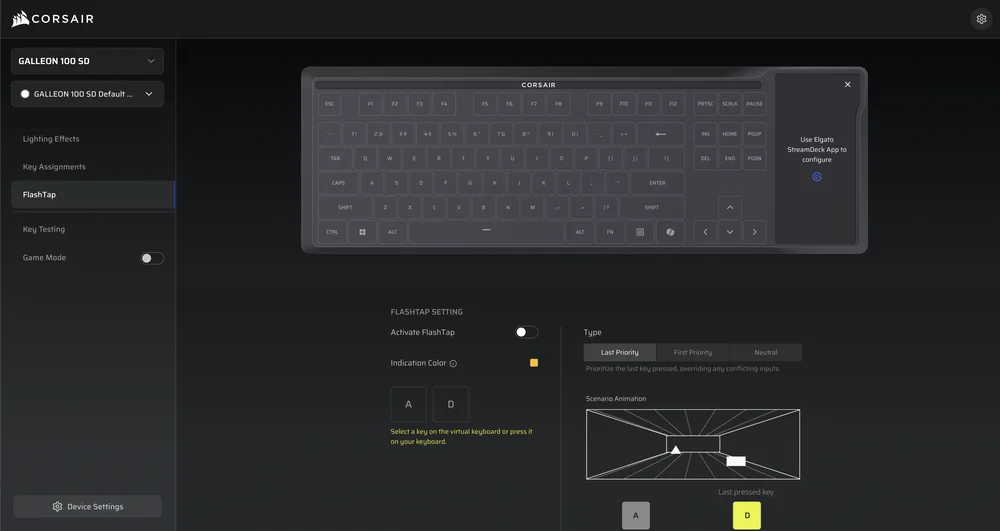
One of the most advanced features accessible through Web Hub is FlashTap SOCD (Simultaneous Opposing Cardinal Directions) control. FlashTap determines how the keyboard resolves conflicting directional inputs such as pressing left and right at the same time.
Through Web Hub, users can:
Enable or disable FlashTap
Choose SOCD priority behavior (first input, last input, or neutral)
Customize how directional keys are handled for movement
This level of control is especially valuable in competitive gaming, where precise movement techniques like counter-strafing or rapid direction changes can provide a tangible advantage. Web Hub makes this configuration approachable without requiring deep technical knowledge.
Game Mode
Game mode settings can easily be adjusted in Web Hub. Game mode applies settings quickly so you can focus on your gameplay. Settings include:
- USB Wired Polling rate
- Brightness
- Static color lighting
- Win Lock
- FlashTap
- Anime Game Mode Activation
Device Settings
Device settings let you adjust behind-the-scenes settings, such as:
- Firmware update checks
- Device connectivity status
- USB Wired Polling Rate
- Current layout
- Win Lock
- Brightness
- Increase Key Switch Debounce Time
Device settings is also where you have the option to perform a Reset to Factory Setting. This option will fully reset your GALLEON 100 SD back to factory defaults like a brand new keyboard.
Designed for Speed and Simplicity
A key strength of CORSAIR Web Hub is its focused scope. Rather than attempting to manage every possible device or workflow, Web Hub is purpose-built to handle:
- Keyboard performance settings
- Lighting and visual customization
- Key assignments and SOCD behavior
This makes it faster to learn, easier to navigate, and less intrusive than traditional device suites. Users can connect, make adjustments, save settings, and disconnect, all in minutes.
A Perfect Complement to Stream Deck Software
On the GALLEON 100 SD, responsibilities are intentionally split:
- Web Hub controls keyboard behavior and performance
- Elgato Stream Deck software controls Stream Deck keys, dials, and LCD actions
This separation keeps each tool focused on what it does best, reducing complexity while maximizing flexibility. Users aren’t forced into a single monolithic application and can customize exactly what they need, when they need it.
Control Without Compromise
CORSAIR Web Hub reflects a modern approach to peripheral configuration that values efficiency, portability, and user control. By delivering powerful keyboard customization through a simple web interface, it ensures the GALLEON 100 SD remains adaptable without becoming cumbersome.
Whether you’re dialing in lighting, refining key behavior, or configuring FlashTap SOCD for competitive play, Web Hub puts essential control right at your fingertips with no installs, no clutter, no compromise.
PRODUCTS IN ARTICLE
JOIN OUR OFFICIAL CORSAIR COMMUNITIES
Join our official CORSAIR Communities! Whether you're new or old to PC Building, have questions about our products, or want to chat about the latest PC, tech, and gaming trends, our community is the place for you.