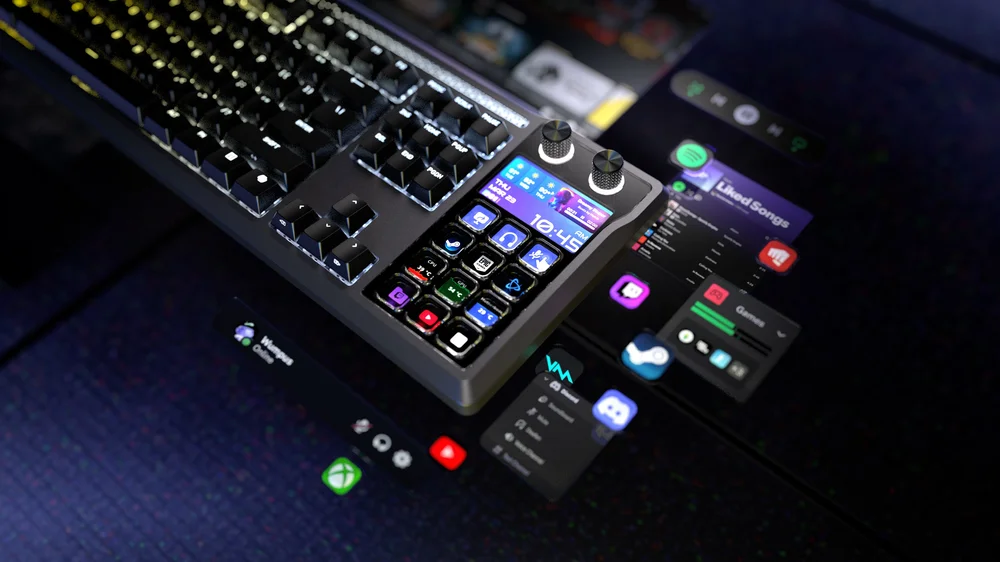
The CORSAIR GALLEON 100 SD stands apart from traditional keyboards by offering two distinct ways to operate its integrated screen, Stream Deck keys, and rotary dials: Hardware Mode and Stream Deck Mode. These modes are not just simply visual presets, and they define how the keyboard behaves, how controls are interpreted, and how deeply the device integrates with your system.
Understanding the difference between Hardware Mode and Stream Deck Mode helps users choose the right experience for gaming, streaming, productivity, or travel, and ensures the keyboard always works exactly as intended.
Hardware Mode: Independent, Reliable, Always Available
Hardware Mode is the default operating state of the GALLEON 100 SD. In this mode, the keyboard runs entirely on its onboard firmware and memory, without requiring any external software to be active.
In Hardware Mode:
- The Stream Deck keys function as standard programmable keys
- The LCD screen displays built-in visuals, themes, or system information
- Rotary dials perform predefined hardware-level actions
- Core keyboard performance features remain fully active
Because everything is handled locally on the keyboard, Hardware Mode is ideal for situations where reliability is critical. This includes competitive gaming, console use, LAN environments, or systems where software installation is restricted.
Hardware Mode ensures that essential functionality is always available the moment the keyboard is plugged in. There’s no dependency on background applications, no delays, and no risk of features becoming unavailable if software closes or crashes.
Stream Deck Mode: Software-Powered Control and Automation
Stream Deck Mode unlocks the full power of Elgato’s Stream Deck ecosystem by connecting the GALLEON 100 SD to the Stream Deck software. When this mode is active, the keyboard’s Stream Deck keys, LCD screen, and rotary dials become fully software-driven controls.
In Stream Deck Mode:
- Stream Deck keys display dynamic icons and live feedback
- Actions are assigned via drag-and-drop in the Stream Deck app
- Multi Actions, folders, and profiles become available
- Rotary dials can control multiple layered actions
- The LCD screen displays widgets, animations, and real-time data
This mode is designed for users who want advanced automation, deep app integration, and visual feedback. Streamers can control broadcasts, creators can manage workflows, and power users can automate complex sequences without leaving the keyboard.
Because Stream Deck Mode relies on software, it is best suited for desktop environments where the Stream Deck app can remain running in the background.
One Seamless Experience
While Hardware Mode and Stream Deck Mode serve different purposes, they are designed to coexist seamlessly. Switching modes allows users to adapt the keyboard to the task at hand without reconfiguring their entire setup.
For example:
- Use Hardware Mode for competitive gaming sessions where stability and simplicity matter most
- Switch to Stream Deck Mode when streaming, editing, or multitasking
- Rely on Hardware Mode when traveling or connecting to a console
- Enable Stream Deck Mode when managing complex workflows at a desk
This dual-mode approach ensures that GALLEON 100 SD never locks users into a single way of working.
Visual and Control Differences Between Modes
The LCD screen behaves differently depending on the active mode. In Hardware Mode, it focuses on built-in visuals, themes, and hardware status. In Stream Deck Mode, it becomes an interactive display tied directly to actions, widgets, and live application data.
Similarly, the Stream Deck keys and dials shift from fixed, hardware-defined behavior to fully customizable, software-driven controls when Stream Deck Mode is enabled.
These differences make each mode immediately recognizable and purpose-built.
Choosing the Right Mode for Your Setup
Hardware Mode emphasizes consistency, independence, and instant availability. Stream Deck Mode emphasizes automation, integration, and flexibility. Neither mode is better overall and they’re optimized for different scenarios.
By offering both, the GALLEON 100 SD delivers a keyboard that adapts to how you use your system, rather than forcing you into a single workflow.
A Keyboard That Adjusts to You
The GALLEON 100 SD isn’t just a keyboard with extra features, it’s a platform designed to scale from simple, reliable input to advanced control and automation. Hardware Mode and Stream Deck Mode represent two sides of that design philosophy.
Together, they ensure that whether you need absolute reliability or maximum customization, your keyboard is always operating in the mode that makes the most sense for the moment.
PRODUCTS IN ARTICLE
JOIN OUR OFFICIAL CORSAIR COMMUNITIES
Join our official CORSAIR Communities! Whether you're new or old to PC Building, have questions about our products, or want to chat about the latest PC, tech, and gaming trends, our community is the place for you.