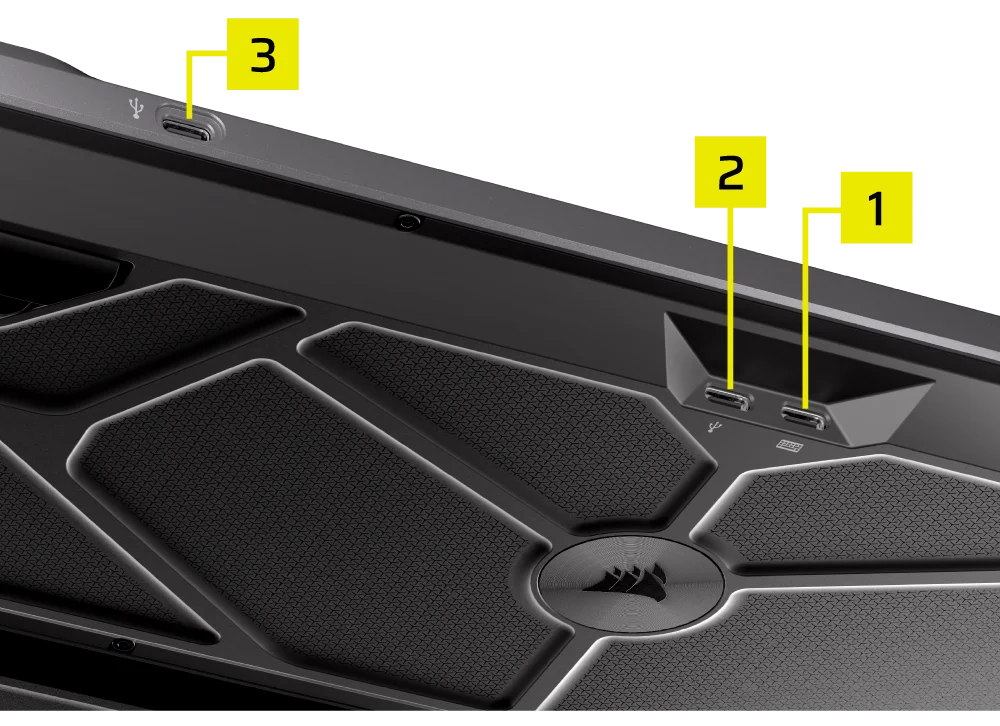
The CORSAIR GALLEON 100 SD is designed to serve as a central command device for gaming, streaming, and productivity, and that role starts with how it connects to your system. Unlike traditional keyboards that rely on a single cable, GALLEON 100 SD uses a dual-USB connection architecture to deliver uncompromised performance, integrated Stream Deck functionality, and convenient USB passthrough without bottlenecks or feature tradeoffs.
Dual USB Connections: Why Two Cables Matter
GALLEON 100 SD ships with two USB Type-A to Type-C cables, each serving a distinct purpose. The primary USB connection (denoted with a keyboard icon) powers the keyboard’s core functionality, including mechanical key input, RGB lighting, high-speed data transmission, and Stream Deck integration. This connection enables advanced features such as 8,000Hz hyper-polling, FlashTap SOCD handling, and real-time LCD updates. These capabilities all demand stable, high-bandwidth communication with the host system.
The secondary USB connection (denoted with a USB icon) is dedicated to USB passthrough. Rather than sharing bandwidth with keyboard input or display data, passthrough operates on its own channel, ensuring that connected devices receive consistent power and performance. This separation is intentional and critical to maintaining low-latency input while still offering expansion flexibility.
What USB Passthrough Enables
USB passthrough on the GALLEON 100 SD allows users to connect additional peripherals directly through the keyboard. Common use cases include plugging in a mouse, headset dongle, USB flash drive, or wireless receiver. By routing these devices through the keyboard, users can reduce cable clutter, keep frequently used ports within easy reach, and simplify desk layouts for compact or multi-device setups.
Because passthrough is electrically isolated from the keyboard’s primary data path, connected devices behave as if they were plugged directly into the PC. This ensures reliable detection, stable power delivery, and predictable performance without interfering with keyboard polling rates or Stream Deck responsiveness.
Best Practices for Setup
For optimal results, CORSAIR recommends connecting both USB cables directly to the motherboard or PC I/O ports, rather than through a hub or splitter. Direct connections help guarantee sufficient power delivery and data integrity, particularly when using high-performance features or powering external devices through passthrough.
If USB passthrough is not needed, the keyboard will still function with only the primary USB connection. However, connecting both cables unlocks the full experience and ensures maximum flexibility as your setup evolves.
Designed for Modern Desktops
The GALLEON 100 SD’s connectivity design reflects its role as a modern control hub, not just an input device. By combining high-speed keyboard communication with dedicated USB passthrough, it supports demanding gaming performance while streamlining how peripherals integrate into your workspace.
In short, GALLEON 100 SD doesn’t just connect to your PC, it helps organize, optimize, and future-proof the way your entire setup connects.
PRODUCTS IN ARTICLE
JOIN OUR OFFICIAL CORSAIR COMMUNITIES
Join our official CORSAIR Communities! Whether you're new or old to PC Building, have questions about our products, or want to chat about the latest PC, tech, and gaming trends, our community is the place for you.